---
title: iButton
slug: zero/ibutton
description: iButton module's functionality and hardware
image: https://archbee-image-uploads.s3.amazonaws.com/3StCFqarJkJQZV-7N79yY/kxsGC_NM-WSR-fkouYYGK_ibutton.png
docTags:
createdAt: 2022-09-19T13:49:38.000Z
---

Flipper Zero supports a 1-Wire device communication protocol, which is implemented in small electronic keys known as iButton keys. These keys are used for access control, temperature measurements, humidity measurements, storing cryptographic keys, etc.
Flipper Zero can read, write, and emulate iButton access control keys with its built-in iButton module, which supports Dallas, Cyfral, and Metakom key protocols.
:::Iframe{iframeHeight="0" code="
Before using the iButton app, make sure to update your Flipper Zero firmware with a microSD card inserted since Flipper Zero stores databases on a microSD card. For more information about the update process, visit the
Firmware update page.
Various iButton devices may have the same form factor, however, only access control keys can be detected by Flipper Zero.
" iframeHeight="0"}
:::
Flipper Zero has a built-in iButton module consisting of an iButton pad and three [spring-loaded pogo pins](https://en.wikipedia.org/wiki/Pogo_pin) that are located on the iButton PCB.
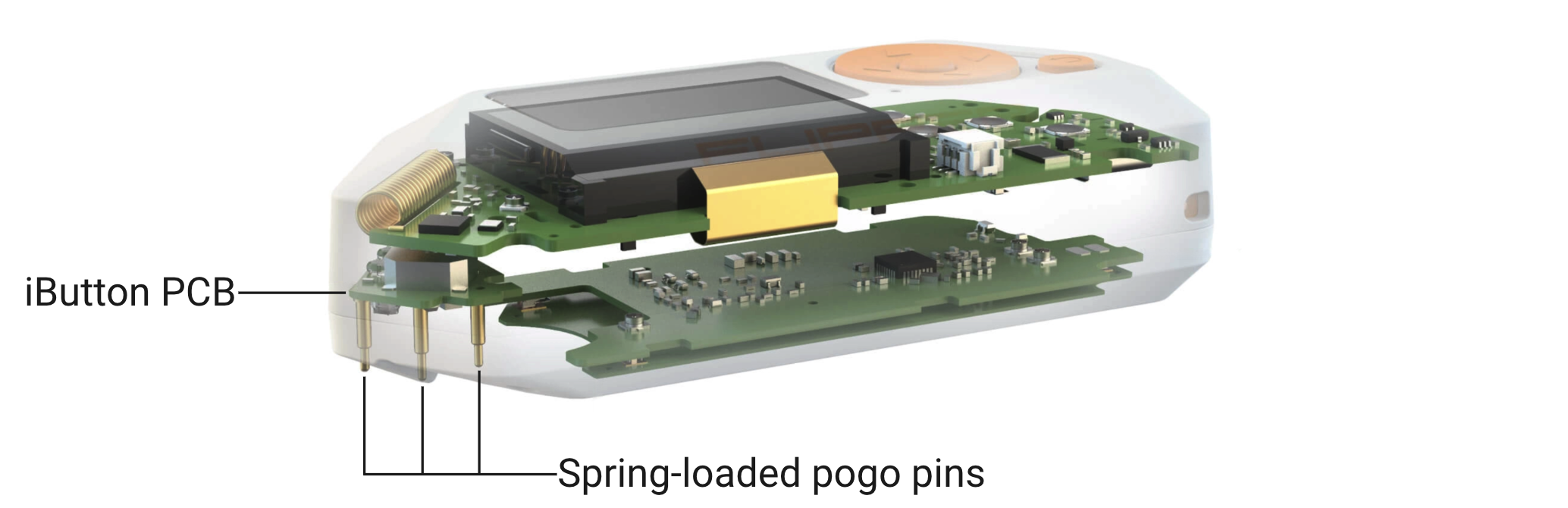
Two pins are assigned to data transfer and have output to the GPIO pin 17. The remaining middle pin is ground.
::Image[]{src="https://cdn.flipperzero.one/Monosnap_Miro_2022-09-28_19-29-05.png" size="82" width="2014" height="1104" caption="iButton data pins have output to the GPIO pin 17" position="center" darkWidth="2014" darkHeight="1104" showCaption="true"}
The flat part of the pad allows connecting an iButton key (Slave) with Flipper Zero (Master). The left data pin and the middle ground pin are used for reading and writing iButton keys.
::Image[]{src="https://cdn.flipperzero.one/Monosnap_Miro_2022-09-29_18-31-34.png" size="90" width="1638" height="802" caption="Pins used for reading and writing" position="center" darkWidth="1638" darkHeight="802" showCaption="true"}
The protruding part of the pad allows connecting Flipper Zero (Slave) with an iButton reader (Master). The right data pin and the middle ground pin are used for emulation of iButton keys.
::Image[]{src="https://cdn.flipperzero.one/Monosnap_Miro_2022-09-29_18-27-39.png" size="90" width="1772" height="890" caption="Pins used for emulation" position="center" showCaption="true"}
***
::::LinkArray{contentSource="CUSTOM"}
:::LinkArrayItem{headerType="IMAGE" headerImage="https://api.archbee.com/api/optimize/3StCFqarJkJQZV-7N79yY/kxtsdU0BA4TeD_rPB0DzR_reading-ibutton-keys-block.png"}
[Reading iButton keys](https://docs.flipper.net/zero/ibutton/read)
:::
:::LinkArrayItem{headerType="IMAGE" headerImage="https://api.archbee.com/api/optimize/3StCFqarJkJQZV-7N79yY/auVfSh9O_eunQEFC421NT_adding-ibutton-keys-manually-block.png"}
[Adding iButton keys manually](https://docs.flipper.net/zero/ibutton/add-manually)
:::
:::LinkArrayItem{headerType="IMAGE" headerImage="https://api.archbee.com/api/optimize/3StCFqarJkJQZV-7N79yY/0ZDwjHr-UPSLC8FcHihOc_writing-data-to-ibutton-blanks-block.png"}
[Writing data to iButton keys](https://docs.flipper.net/zero/ibutton/write)
:::
:::LinkArrayItem{headerType="IMAGE" headerImage="https://api.archbee.com/api/optimize/3StCFqarJkJQZV-7N79yY/FaM11lt8jMe1TQWYp52A6_pflnlgh9s-xtykklkskb1-monosnap-miro-2022-10-25-19-39-43.webp"}
[Flipper Zero schematics](https://docs.flipper.net/zero/development/hardware/schematic)
:::
:::LinkArrayItem{headerType="IMAGE" headerImage="https://api.archbee.com/api/optimize/3StCFqarJkJQZV-7N79yY/7_VPROKgReSBtiBsWiw5z_qk2fdzhhnl66ou16o74iw-monosnap-miro-2022-10-25-19-31-25.webp"}
[iButton application source code](https://github.com/flipperdevices/flipperzero-firmware/tree/dev/applications/main/ibutton)
:::
::::