Controls
This page describes the controls of Flipper One — the buttons, touchpad, and D-pad used to navigate the interface, switch apps, and trigger device-level actions like power and recovery. Most buttons are adaptive and context-dependent: their current action is shown on the screen above the button.
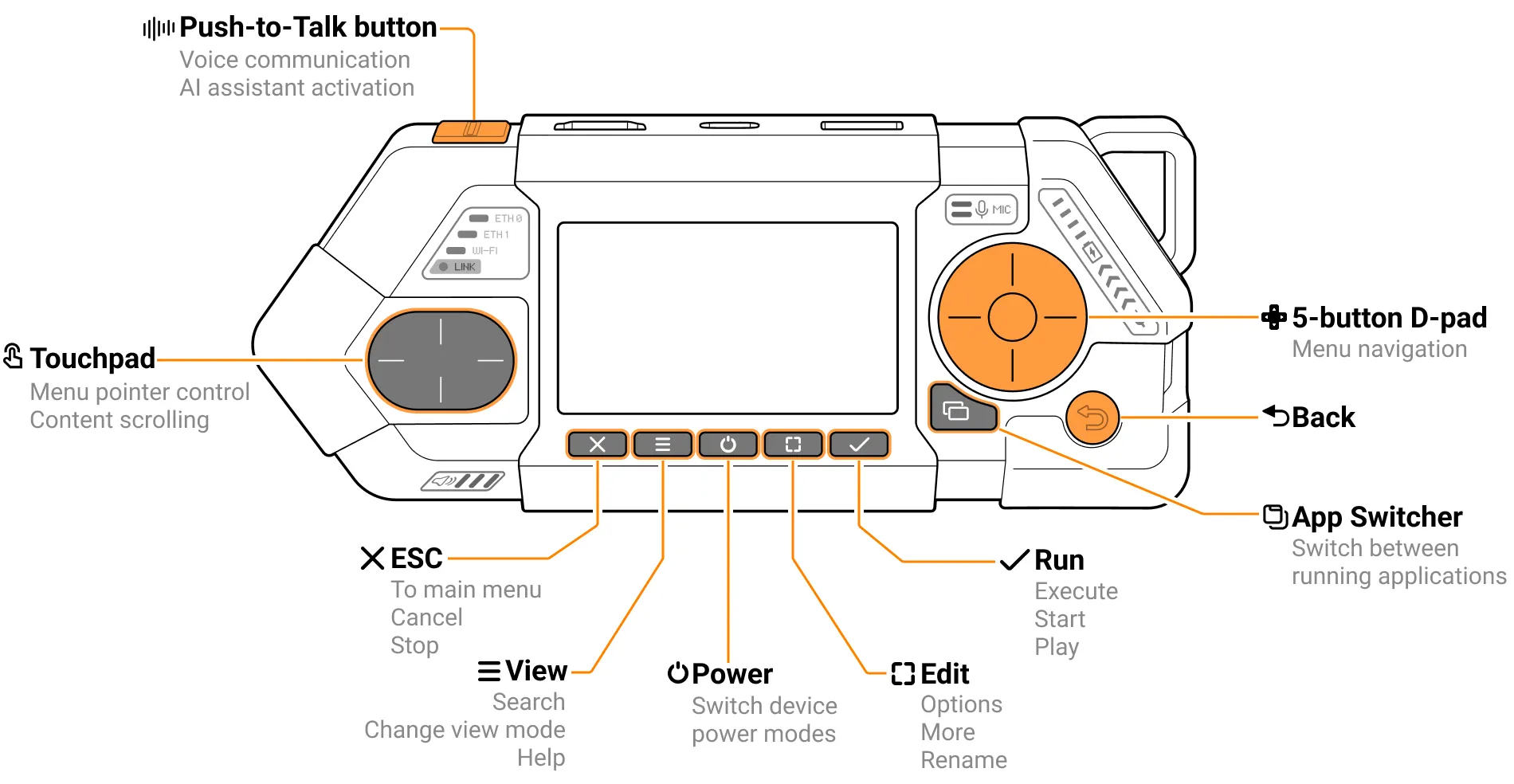
Controls description
Control | Description |
|---|---|
PTT Button  | Push-to-talk button to activate microphone in walkie-talkie mode, for voice control and more. This button may be used as an adaptive App-Defined Button. In this case, the current action is context-dependent and displayed on the screen. |
Touchpad  | Touchpad for on-screen keyboard and menu navigation, content scrolling. Support horizontal and vertical scroll. Most likely will be always duplicate D-pad navigation and will be used for quick move in long lists. |
ESC button  | Adaptive App-Defined Button. Current action is context dependent and displayed on screen above the button. Recommended UI actions: cancel, stop, pause, breake, abort, back, discard. |
Edit button  | Adaptive App-Defined Button. Current action is context dependent and displayed on screen above the button. Recommended UI actions: more, edit, extra, config, rename. |
Power button  | Long press for 1 second: Device power mode control: turn ON/OFF, reboot. Short press on Linux level: Action is context dependent and displayed on screen above the button. |
View button  | Adaptive App-Defined Button. Current action is context dependent and displayed on screen above the button. Recommended UI actions: help, search, view. |
Run button  | Adaptive App-Defined Button. Current action is context dependent and displayed on screen above the button. Recommended UI actions: start, run, enter, save. |
App Switcher  | Works only on Linux level: ALT+TAB like button, list all opened apps windows. |
Back button  | Back, exit in menus and apps. |
D-pad  | Main navigation D-pad with 5-buttons: UP, DOWN, LEFT, RIGHT and OK in center. |
Buttons shortcuts
Some buttons and their combinations have hardware-defined behavior that does not depend on software. These combinations can hardware-reset, power off, or put the device into full recovery mode.
Action | Description |
|---|---|
Hardware Restart | Back + Left — hold for 3 seconds. This will send an uninterceptable hardware reset to the CPU and MCU chips. |
Power ON | Hold Power button for 1 sec to turn ON device from Power OFF. First turn ON from transport mode is the same Power ON. Connecting USB to charging port also Power ON the device. |
Full Power Cycle (Hardware Reboot) | Hold Power button for 10 seconds to completely power cycle device. It will quickly turn off and on battery. What will happen when USB charger connected? |
Firmware Recovery | Hold ESC + Run + Back + Left for 3 seconds. Think of this as a normal Hardware Restart made by Back + Left, but Firmware Recovery is triggered if ESC + Run are pressed while the MCU is starting. This puts the RP2350 MCU into the UF2 bootloader (BOOTSEL mode). If Firmware Recovery is successful, you will see a USB Mass Storage Device named FlipOneMCU. |