Flipper OS
Flipper OS is a Linux-based operating system we are developing for the Flipper One. This page outlines the core concept behind Flipper OS and explains how we aim to solve common challenges users face when using a Linux computer as an all-in-one multitool.
The messy system problem
When you try to use any Linux-based SBC as a universal “on-the-go” tool and keep changing its purpose over time, for example using it as a media server, a Wi-Fi router, or a desktop, you eventually end up with a messy system. You install so many packages and modify so many system configuration files that, at some point, reconfiguring the system becomes harder than reinstalling the OS and rebuilding the entire setup from scratch.
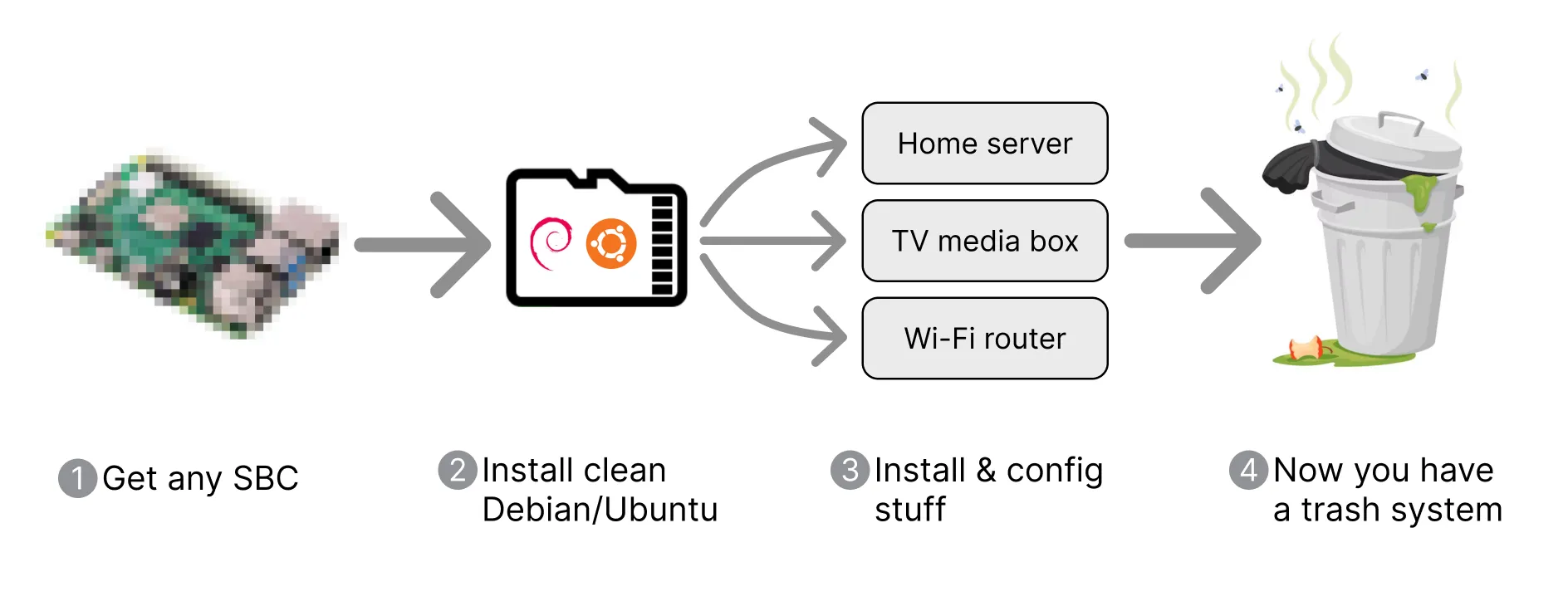
Flipper OS is designed to resolve the messy system problem. To better understand what Flipper OS does and why, let's first make an overview of other ways to approach this problem.
Common approach and its issues
One approach to the messy system problem is to use separate SD cards for different preconfigured setups. However, juggling SD cards is inconvenient and does not scale well.
Issues with the SD card approach:
- Cannot restore configuration to default. The only way to revert to default settings is to reinstall the operating system.
- Single configuration state, no alternative profiles, and no recovery points. The system has only one current configuration. Once you modify config files or install packages, the previous state is lost. You cannot easily switch between setups, save working versions, or roll back after breaking something.
- Easy to break the system. Small changes, incorrect packages, or edits to config files can easily make the system unstable or cause it to stop working correctly.
- No atomic updates. If an update fails midway, the system can end up in a partially updated or broken state. Updates may also conflict with modified system config files, and newer packages can conflict with your customized environment.
Flipper OS architecture
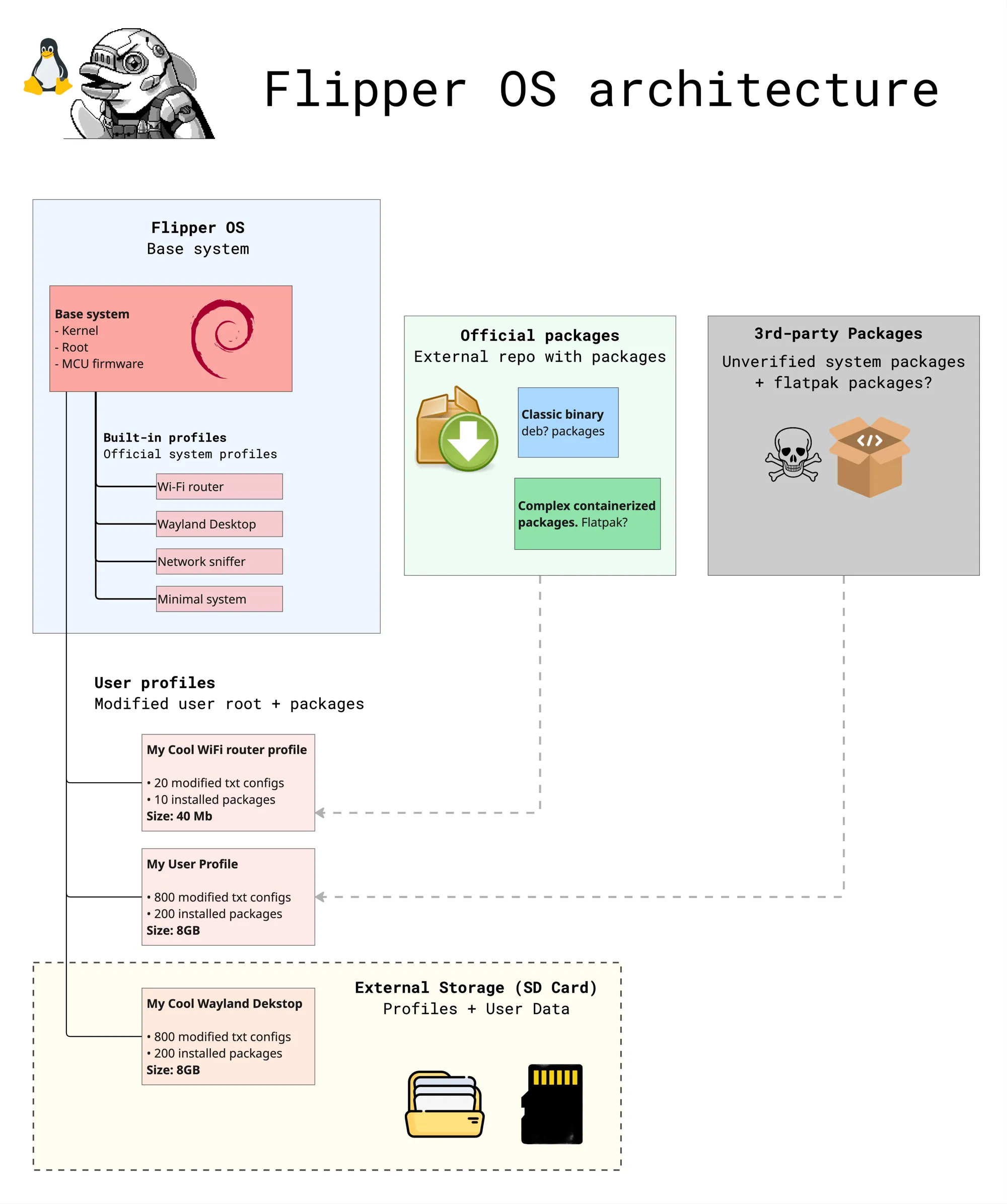
Flipper OS introduces the concept of operating system profiles, which are architecturally separated from the base system.
Thus, the operating system consists of two distinct parts:
Flipper OS base system — a clean, unmodified Debian-based system. It consists of Linux kernel, RootFS, and MCU firmware. The base system is distributed through official updates. This part of the operating system remains unchanged during user customization and configuration.
OS profiles — an overlay on top of the base system that contains all user customizations, including installed packages, containers, and modifications to the RootFS including config files edits. By applying an OS profile to the Flipper OS base system, you get a fully configured system tailored for a specific use case.
- Official built-in OS profiles are distributed as part of the operating system, for example: Minimal system, Wi-Fi router, TV media box, Network sniffer, and Desktop computer.
- User OS profiles contain user-modified packages and RootFS changes. Users configure the system in the usual way by editing configs and installing packages using package manager. The process remains fully transparent to the user, while all changes are automatically stored inside the active profile. In addition to OS profiles, users can separately store personal files such as media files, documents, and other data not related to the operating system. User OS profiles can be stored on removable media, allowing users to select and boot a profile from the boot menu, for example from an SD card.
OS profile selection at boot
An operating system profile can be selected directly from the boot menu without connecting an external monitor or keyboard. The menu also allows users to clone profiles and restore them to their original preconfigured state.
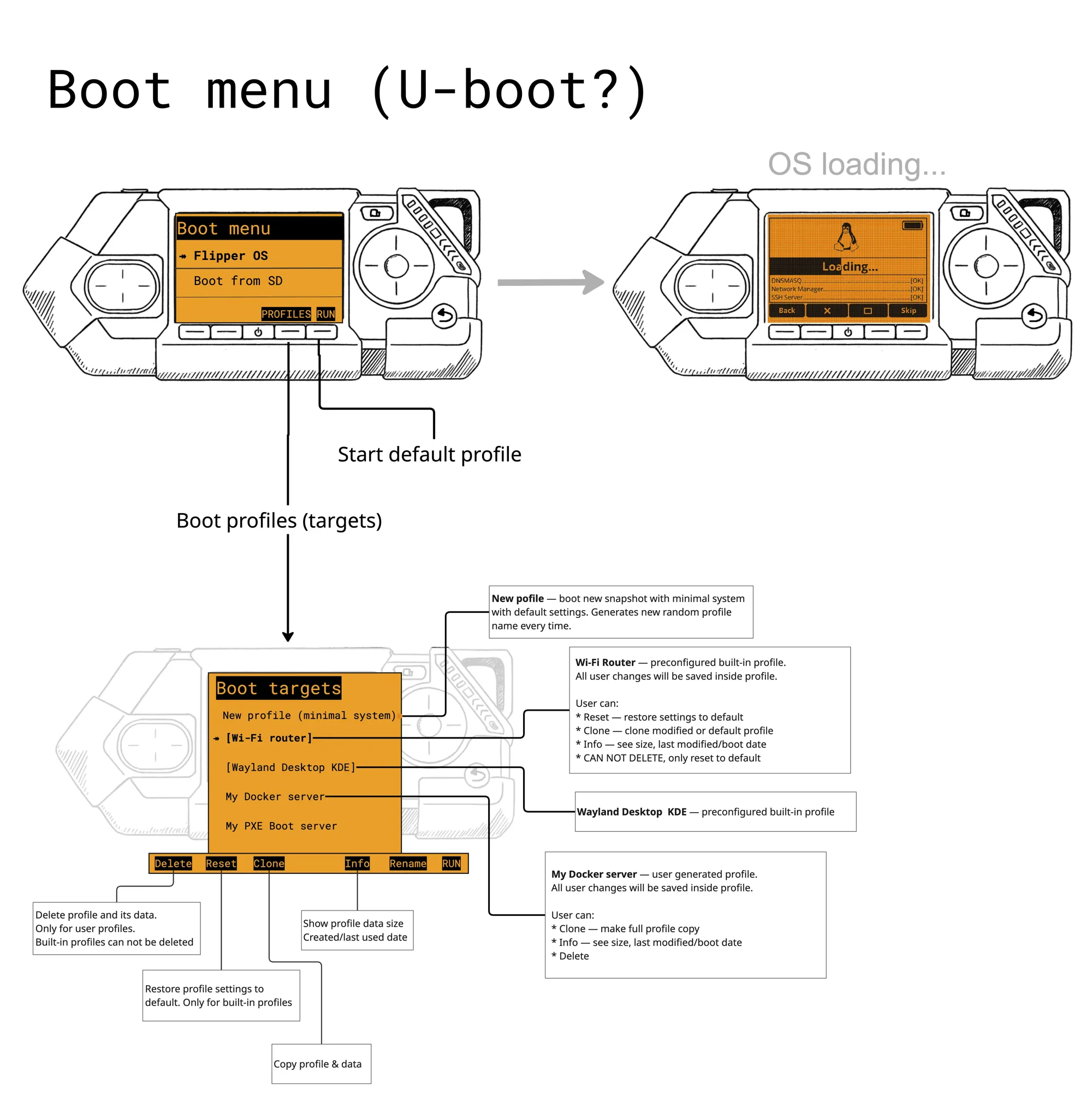
Official built-in OS profiles cannot be deleted, but they can be cloned and used as a base for creating user profiles. At any time, a profile can be quickly reset to the default state of the original official built-in OS profile.
Managing OS profiles on running system
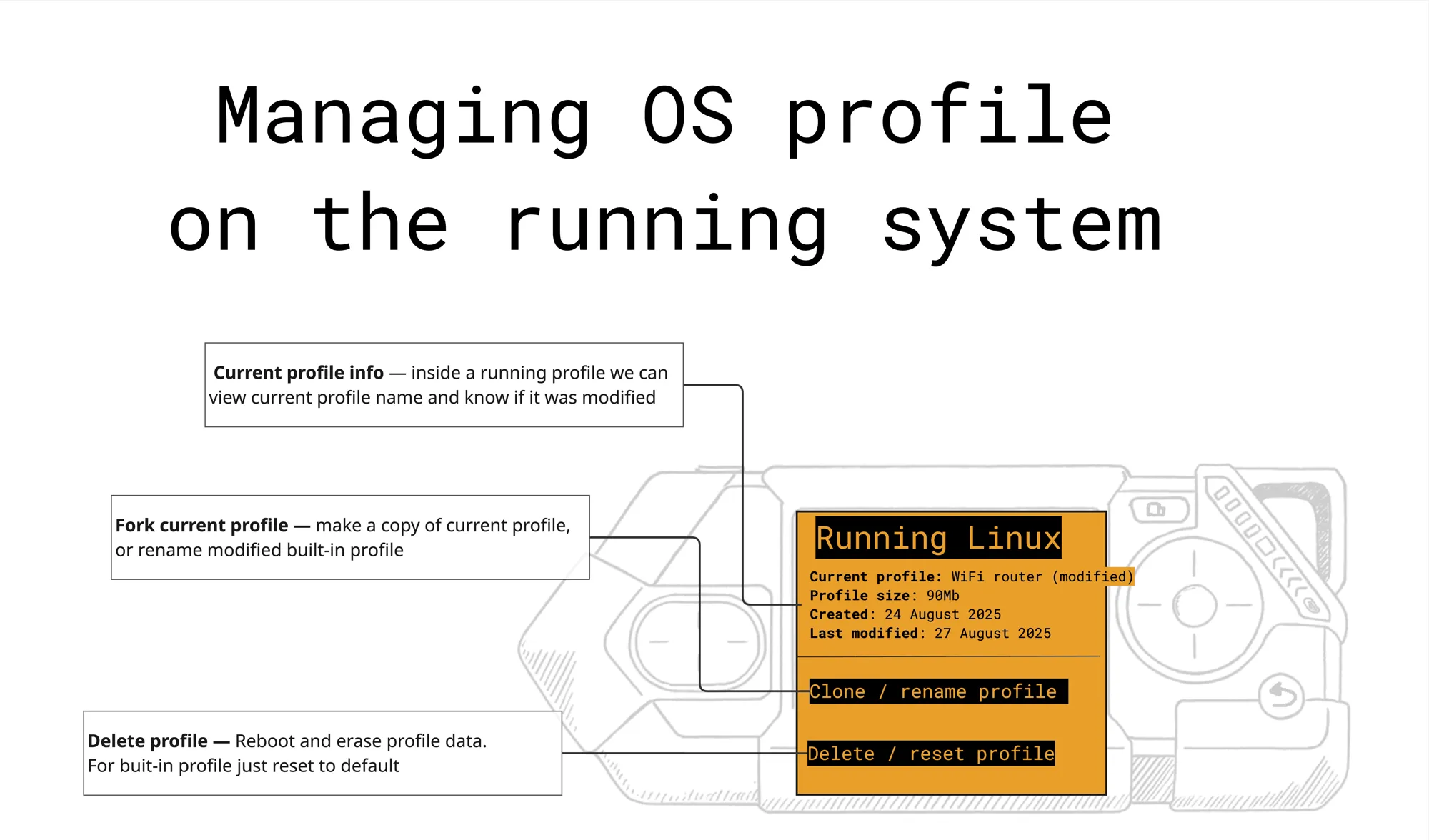
On a running system, the user can:
- View the current OS profile info, including the profile name, size, creation date, modification date, and other details.
- Clone the built-in OS profile or rename the user OS profile.
- Delete the user OS profile or reset a built-in OS profile to its default state.
System update
Flipper OS includes an update agent that notifies the user about available system updates from any active OS profile. Both the base system and the official built-in profiles are updated.
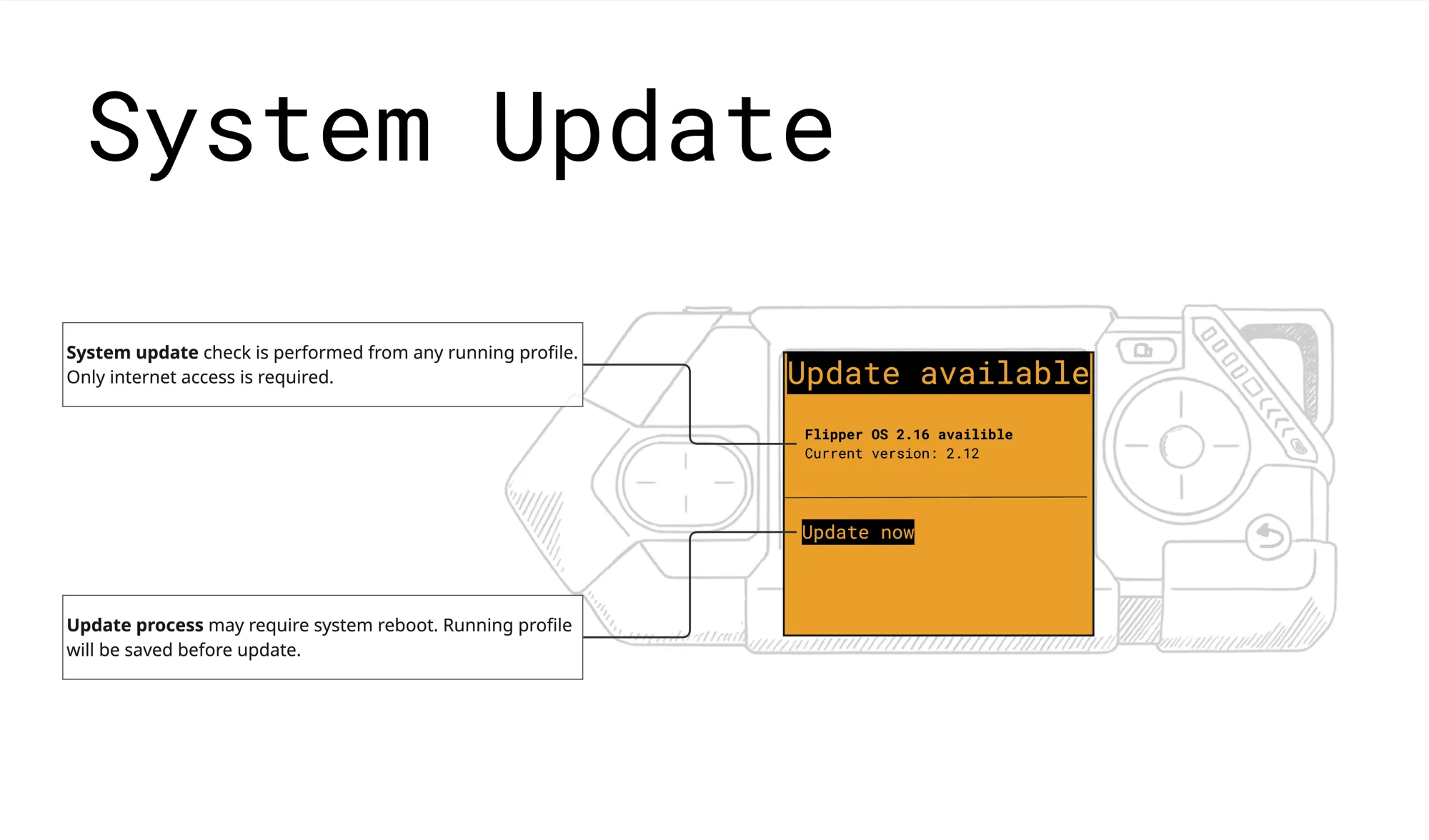
We are currently exploring mechanisms for reliable atomic updates of both the operating system and OS profiles. We invite the community to help develop the best solutions.