Video Decoding
Hardware video decoding tests
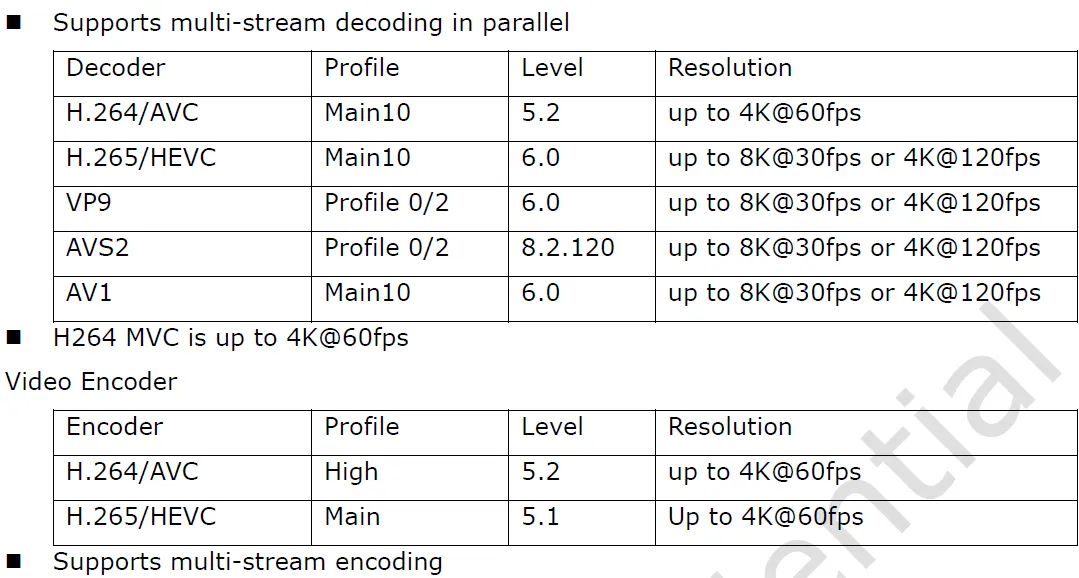
Rockchip RK3576 supports hardware video decoding of popular codecs up to 8K@30fps for H.265/HEVC. This section describes how to properly test hardware video decoding.
Rockchip RK3576 Hardware Video decoders
Sample video files
Video File | Description |
|---|---|
H.264/AVC, Bitrate: 250 Mbps, 3840x2160, 30 fps, Profile: High 8 bit color, Level: 5.1 | |
H.265/HEVC Bitrate: 150 Mbps, 7680x4320, 60 fps, 10 bit color | |
H.265/HEVC 7680x4320, 30 fps, 10 bit color (⚠️ Dirty re-encoding to match 30FPS, Bitrate around 50 Mbps, not trusted sample) |
Current status
H.264/AVC (Jellyfish 4K AVC.mkv)
H96 Max M9 Android TV | Flipper Linux Builds |
|---|---|
✅ No drops | ❌ Frame drops |
H.265/HEVC (Jellyfin 8K 60FPS HEVC.mp4)
H96 Max M9 Android TV | Flipper Builds |
|---|---|
❌ Frame drops | ❌ Frame drops |
H.265/HEVC (Jellyfin 8K 30FPS HEVC.mp4)
H96 Max M9 Android TV | Flipper Builds |
|---|---|
✅ No drops | ❌ Frame drops |
Have a question?
Our support team and an awesome community will get you an answer in a flash. Please leave your questions in English.
To ask a question or participate in discussions, you'll need to authenticate first.