#11: Making Flipper One truly portable
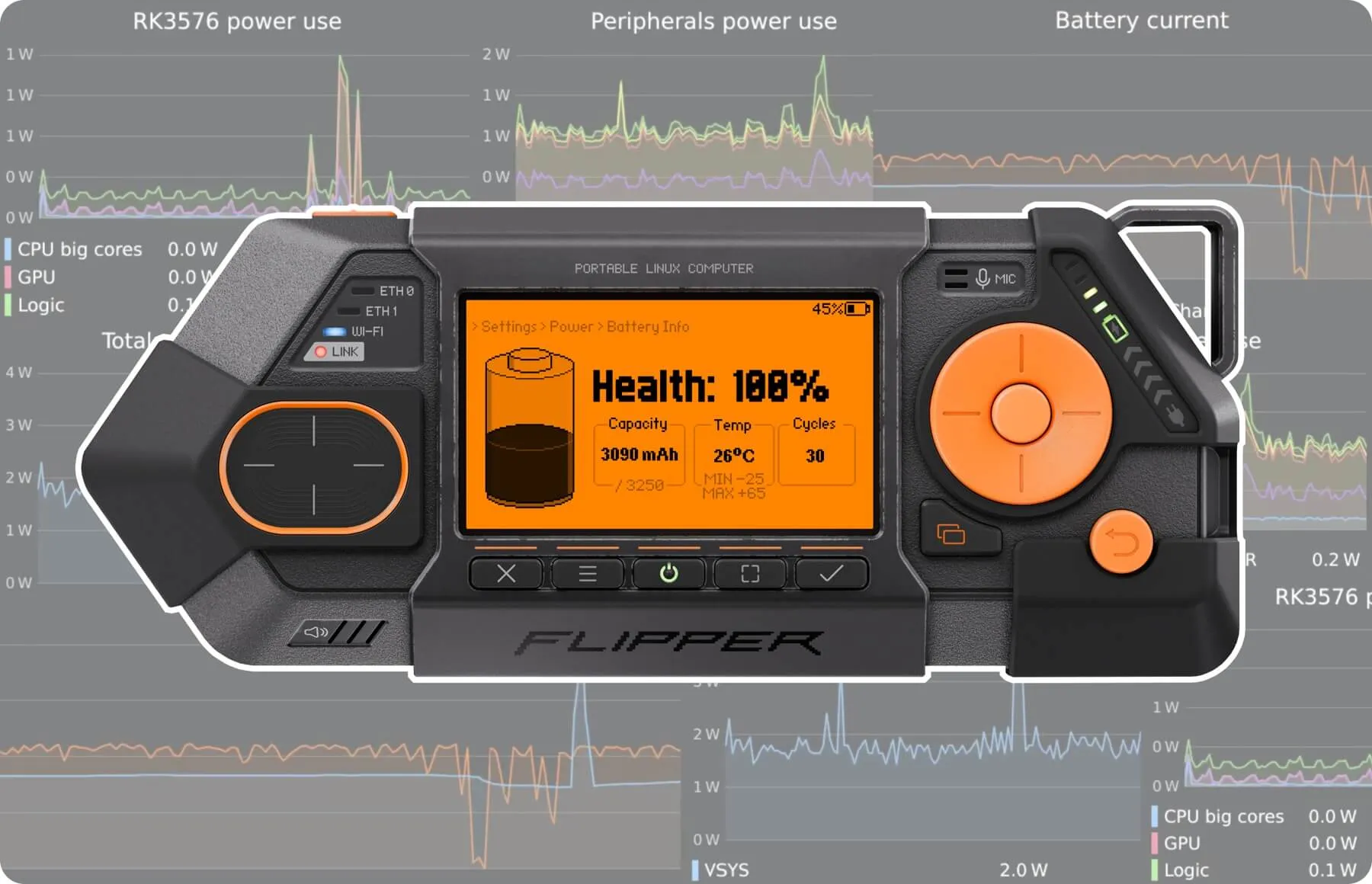
Flipper One is a portable device, so long battery life is one of our key priorities. In this dev log, we’ll show you how Flipper One achieves up to 24 hours of battery life while running Linux. We’ll measure its power draw in different scenarios, go under the hood to see how it tracks its power consumption in real time, and take a closer look at the built-in Power Meter.
Three ways to improve battery life
To extend Flipper One's battery life while running Linux, we build Flipper One with:
- 24Wh, two-cell Li-ion battery to provide sufficient energy capacity.
- Power-efficient system-on-chip. The Rockchip RK3576 consumes less power than the Raspberry Pi 5's SoC while delivering comparable multi-threaded performance.
- Low-power LCD. Our display uses 10x less power at full brightness than typical cyberdeck displays and remains readable in sunlight with the backlight off.
Less than 1 W power draw with Linux running
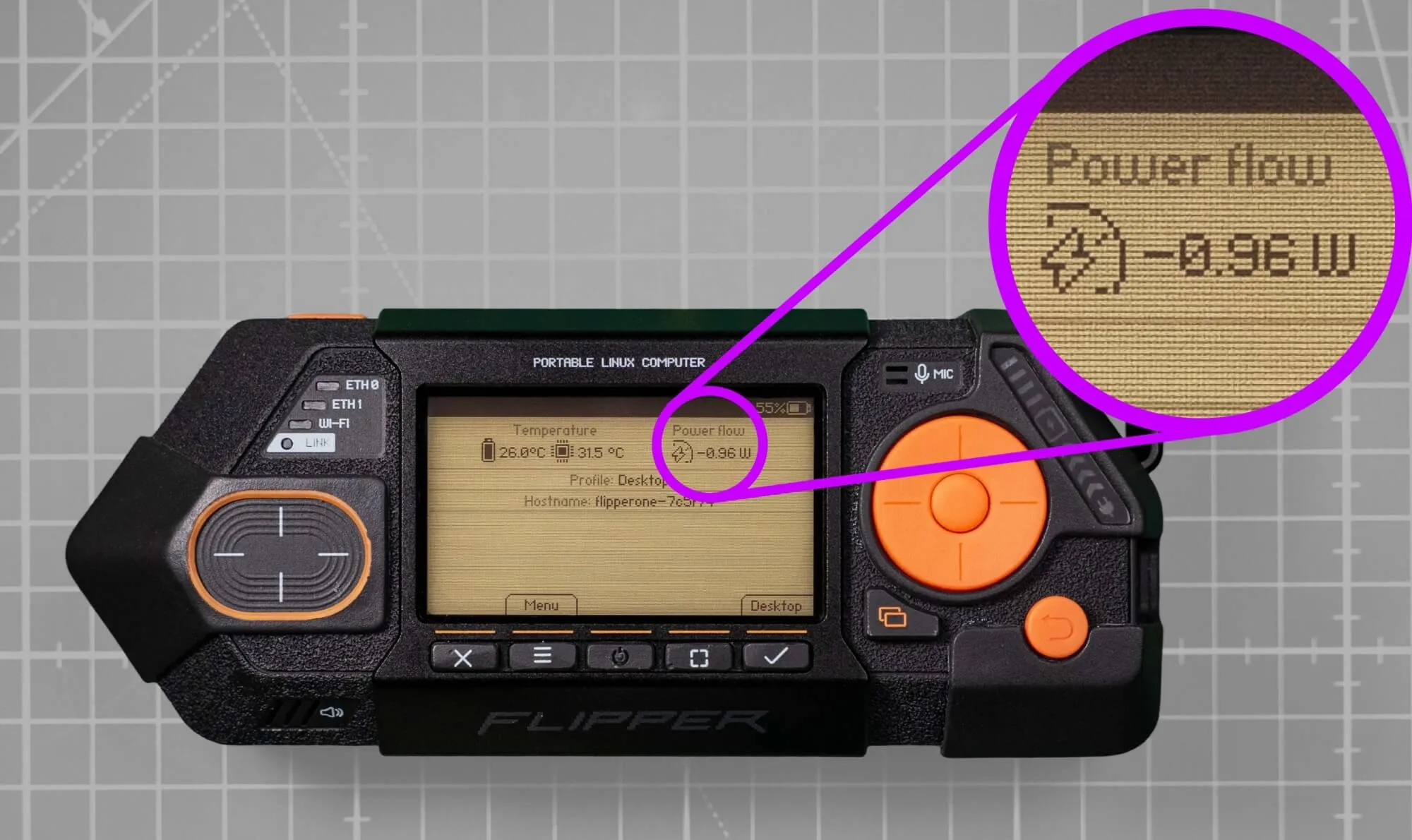
Flipper One consumes just 0.96 W running Linux, with Wi-Fi disabled, Ethernet and USB ports unused, and no external monitor, USB peripherals, or expansion modules connected. So, in this setup, it can run on battery for 24 hours without sleeping or shutting down.
And there's still room for improvement
For example, check out our open call for implementing dynamic RAM frequency scaling, which could save a little more power under light memory loads.
High performance at low power
Let’s compare the power consumption of Flipper One (Rockchip RK3576) with the Raspberry Pi 5B (Broadcom BCM2712) — one of the most popular single-board computers.
We tested three scenarios:
- Headless Linux, idle — Linux without a desktop environment, no monitor connected, system idle.
- Desktop Linux, idle — Linux with a desktop environment, with a Full HD monitor connected via HDMI, system idle.
- Desktop Linux, CPU stress — Linux with a desktop environment, with a Full HD monitor connected via HDMI, and an 8-thread CPU stress test running in sysbench.
In all scenarios, Wi-Fi and Bluetooth were disabled, Ethernet ports were unused, and no expansion modules were connected.
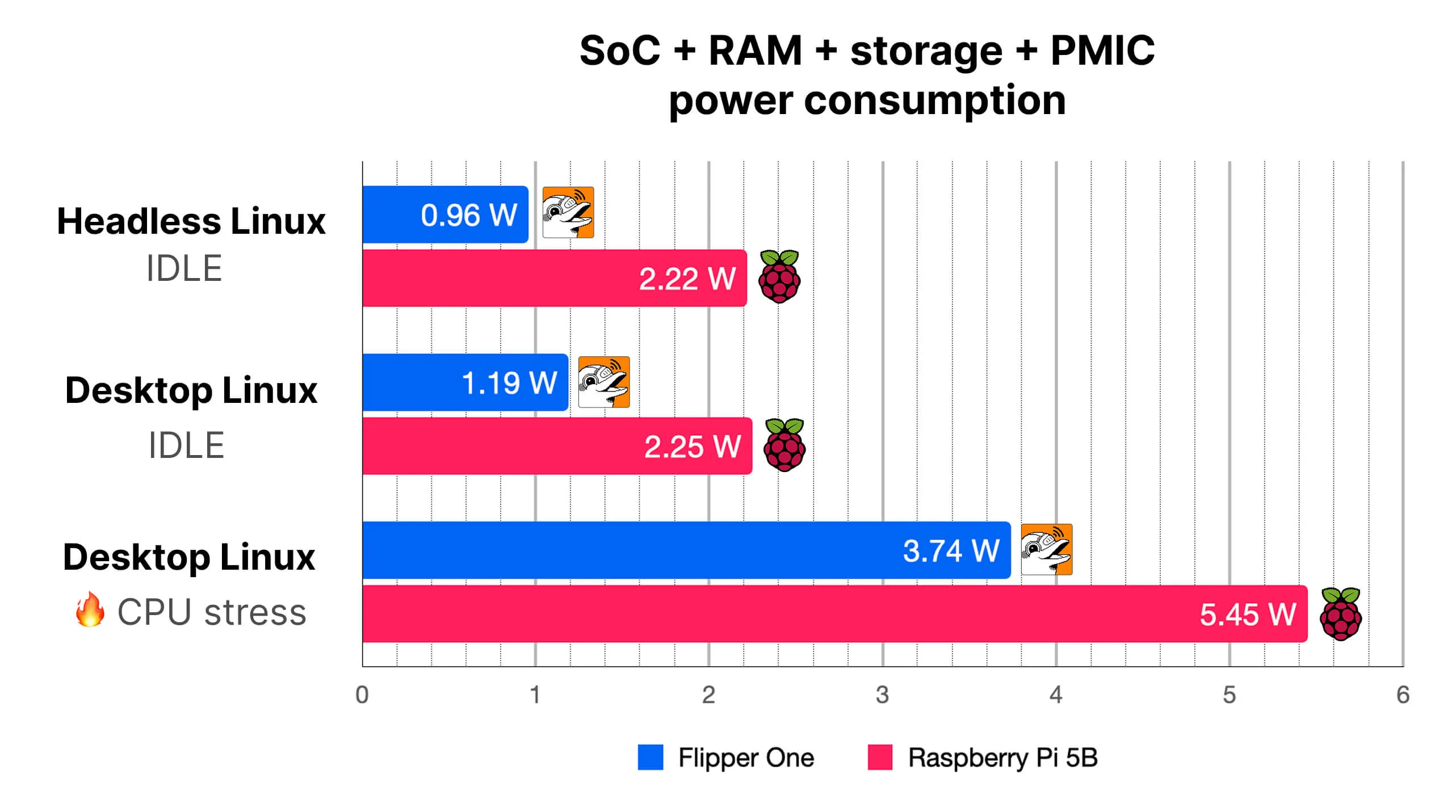
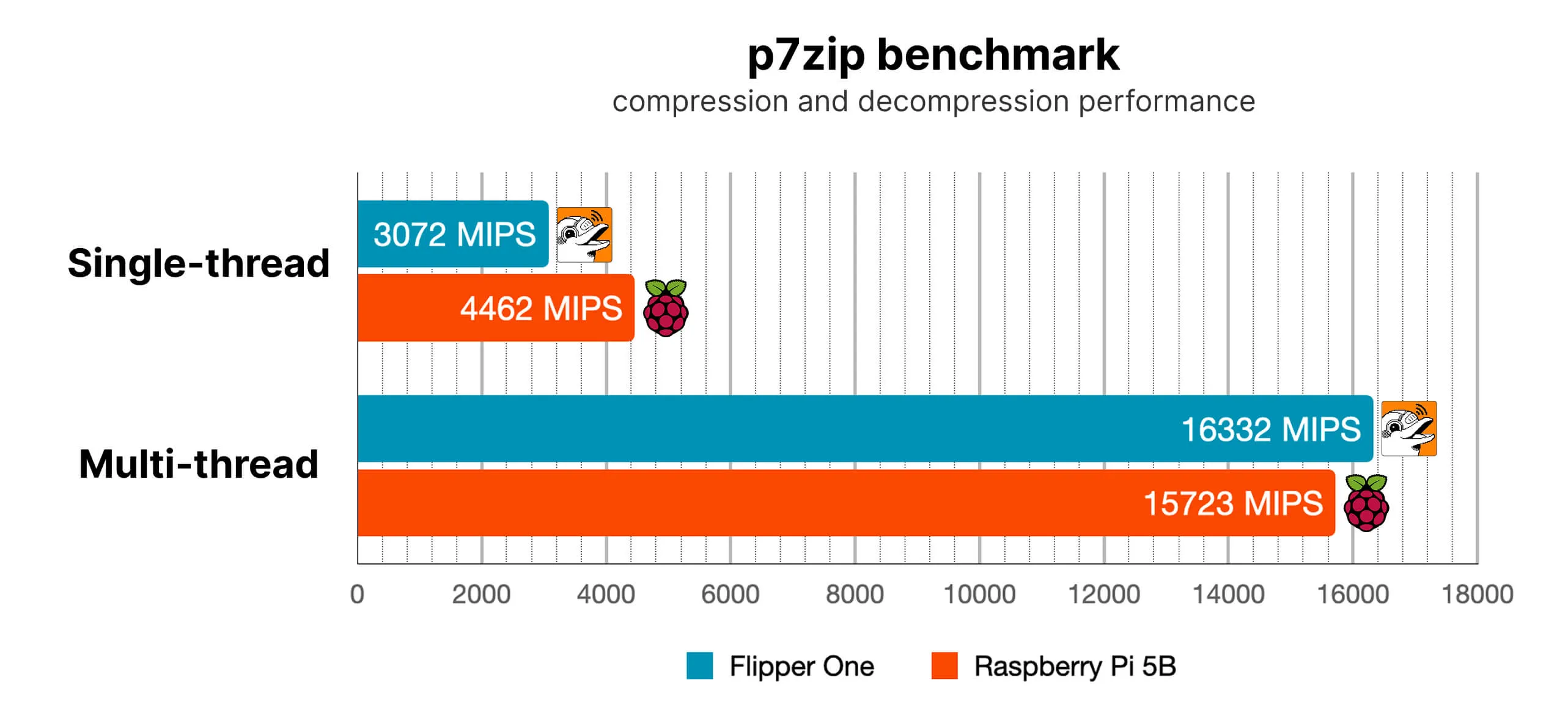
Flipper One uses less power in every tested scenario while delivering slightly better multi-core performance in the p7zip benchmark. The benchmark was run with active SoC cooling to prevent thermal throttling.
Peripherals also consume power
Ethernet controllers, the Wi-Fi module, USB peripherals, and expansion modules connected via GPIO or M.2 also consume power. The table below shows the power draw of some of Flipper One's built-in components.
Component | Power consumption |
|---|---|
Ethernet port (1 Gbps link, idle) | 0.40 W each |
Ethernet port (1 Gbps link, high TX+RX load) | 1.34 W each |
Wi-Fi + BT module (Wi-Fi 6 connected, idle) | 0.90 W |
Wi-Fi + BT module (Wi-Fi 6 connected, high TX+RX load) | 1.86 W |
Display backlight (10%) | 0.04 W |
Display backlight (100%) | 0.22 W |
Battery life in different use cases
Flipper One's battery life can be estimated by dividing its battery capacity (24 Wh) by its total power draw. For example, at 2 W, the estimated battery life is 24 ÷ 2 = 12 hours.
Here are some example use cases:
- Desktop for web browsing (Wi-Fi): 2.5 W power draw, 9.6 hours of battery life.
- Smart home server (wired LAN): 1.5 W power draw, 16 hours of battery life.
- Wi-Fi router (wired ISP, Wi-Fi for clients): 4.5 W power draw, 5.3 hours of battery life.
- Meshcore node (with external module): 1.1 W power draw, 21.8 hours of battery life.
How Flipper One measures power consumption
Flipper One displays the power subsystem's real-time status on its home screen and in the built-in Power Meter.
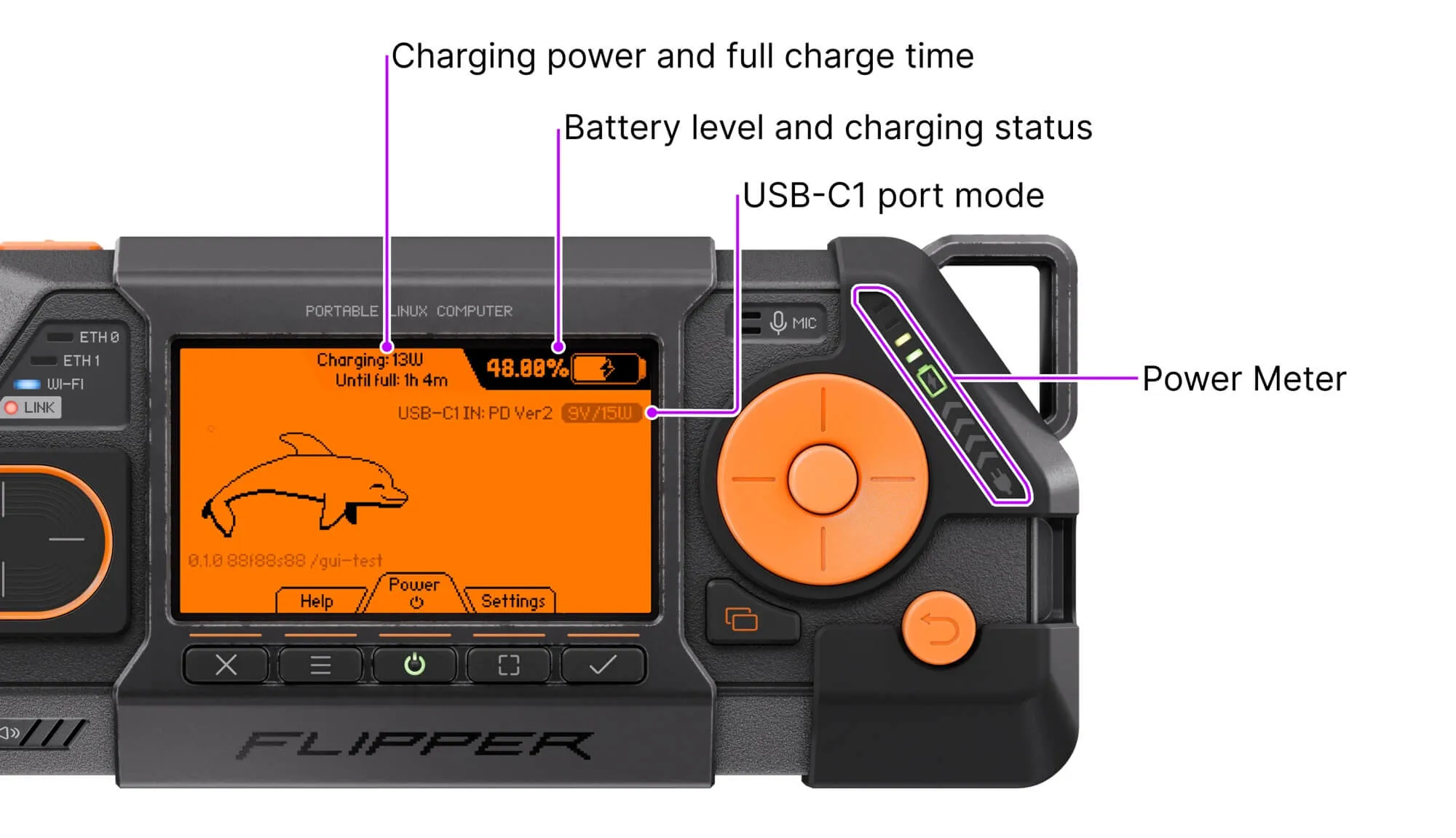
The device continuously monitors its power subsystem using three dedicated chips:
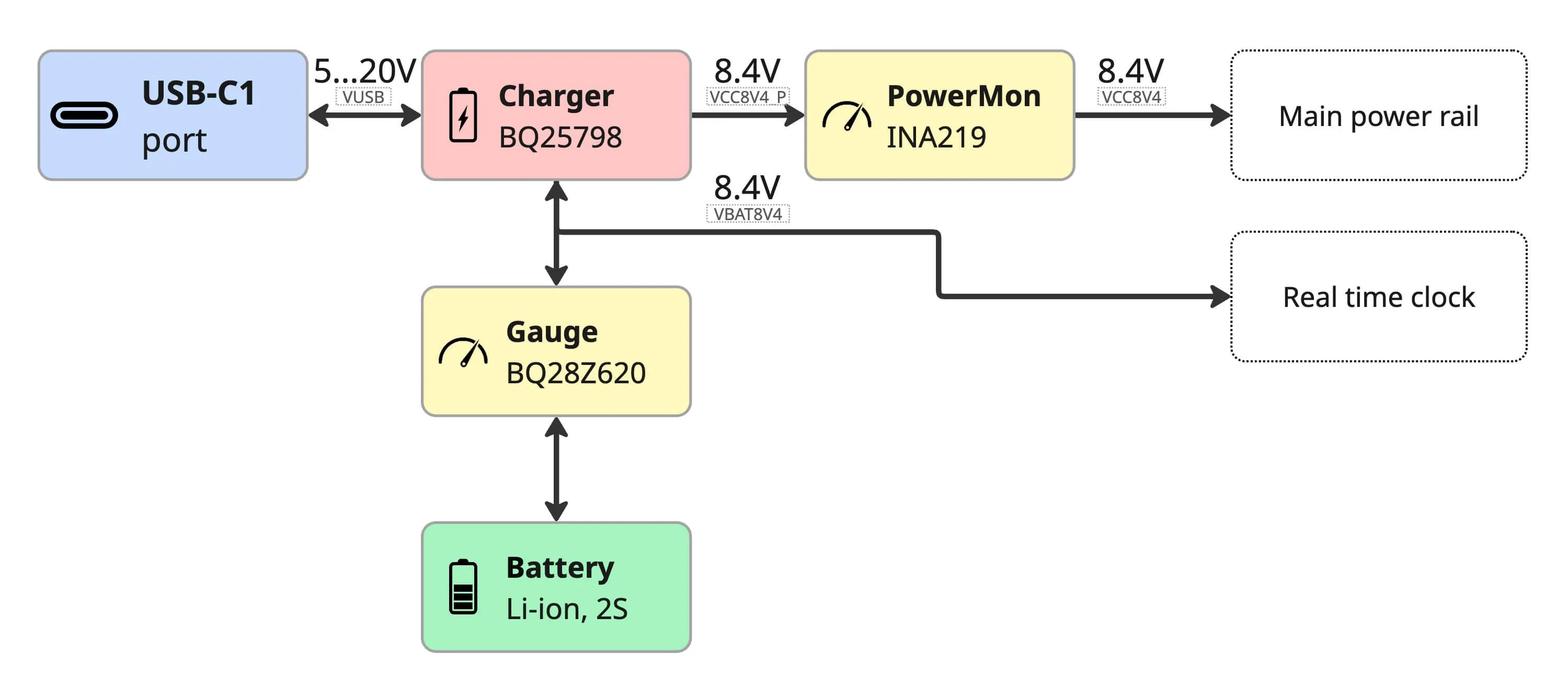
- Battery charger (BQ25798) — manages battery charging and measures the power flowing into and out of the device through the USB-C1 port.
- Battery gauge (BQ28Z620) — protects the battery, balances cells, and measures the energy flowing into and out of the battery.
- Power monitor (INA219) — measures the power consumed by the entire device, excluding the real time clock (RTC), whose power consumption is negligible.
A simplified block diagram of the charging and power monitoring subsystem is shown below. For a more detailed diagram, see the Power subsystem page.
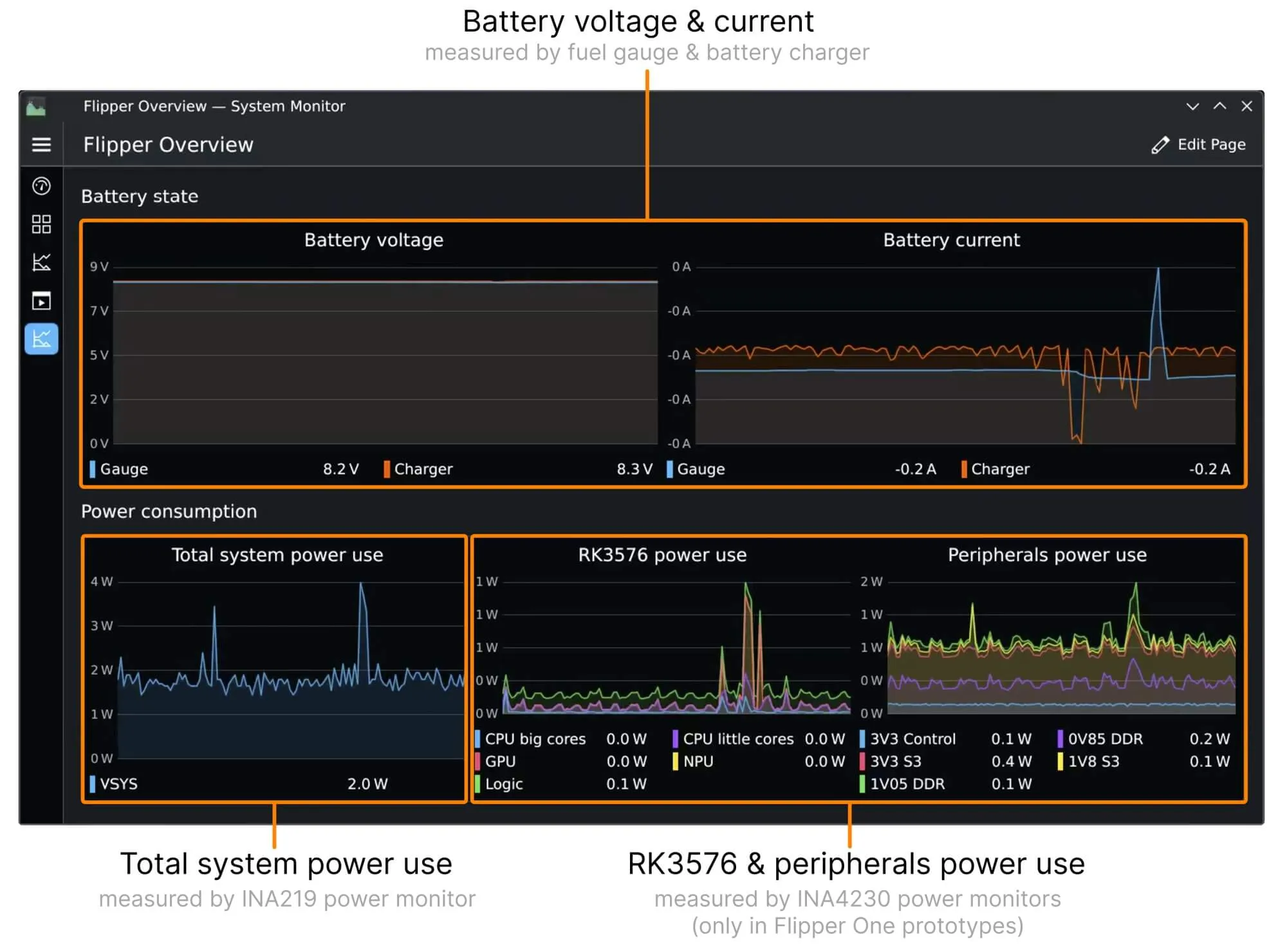
The RK3576 reads measurements from the monitoring chips over the I²C bus, making them available in Linux through tools like the sensors command. You can also view measurement graphs in System Monitor in the Desktop profile:
Prototype vs. production units
Prototype units include additional INA4230 power monitors for individual power domains. Production Flipper One units will provide measurements from only the three main chips: the battery charger, battery gauge, and power monitor.
How the built-in Power Meter works
The Power Meter is an LED indicator divided into multiple sections that displays real-time power subsystem status. The video below explains how it works and how to use it to monitor power consumption, check whether the battery is charging, and see how much power is coming in through the USB-C1 port.
For a text-based explanation, see the Power Meter page in the Dev Portal.
Join Flipper One development and make your contribution
Flipper One is under active development. We welcome everyone who wants to test it, share feedback, and help shape its future.
- Pick a task: Browse the 🚧 Open tasks page for ways to contribute.
- Share your project: Built something that helps test or improve Flipper One? Add it to the community projects page.
- Contribute module & accessory 3D models: Check out the contribution guide and open a pull request in flipperdevices/flipperone-mechanics.
See you in the next Dev Log!