RM520N-GL
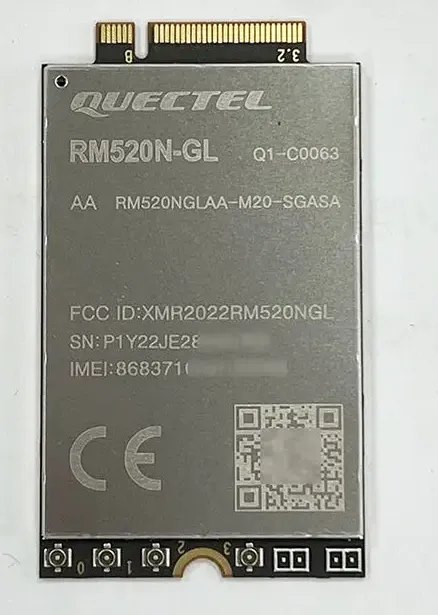
The Quectel RM520N-GL is a 5G Sub-6 GHz M.2 modem. Flipper One detects it over USB 3 with no extra setup: the in-kernel option and qmi_wwan drivers bind to it, and ModemManager uses the quectel plugin to talk to it over QMI.
Status
Check | Status | Notes |
|---|---|---|
USB enumeration | ✅ | SuperSpeed (5 Gbps), 2c7c:0801 |
Kernel drivers | ✅ | mainline option + qmi_wwan, no patches |
ModemManager detection | ✅ | quectel plugin, QMI primary port |
SIM detection | ✅ | slot 1, USIM, PIN disabled |
Network registration | ✅ | Vodafone UK (234/15), home network |
Data connection (NetworkManager) | ✅ | IPv4 over raw-ip QMI, MTU 1500 |
Signal and cell info (ModemManager) | ✅ | serving and neighbour cells, LTE and 5G signal |
LTE carrier aggregation | ✅ | B1 + B20 aggregated (B7 configured but not active) |
5G NR (NSA) | ⚠️ | cell advertises NSA, but no stable NR link during the test (weak signal) |
5G NR (SA) | ⚠️ | not tested: no SA service from the network |
AT command ports | ⚠️ | both ports are held by ModemManager. Use debug mode for tests, see AT commands |
Per-antenna signal | ✅ | all four receive paths work. On B20 only two are used, see Per-antenna signal |
Module temperature | ✅ | 44–47 °C during the test, no heatsink |
GNSS | ⚠️ | engine starts and outputs NMEA through gps-unmanaged; no satellites in 5 min indoors. ModemManager's QMI GNSS modes fail, see GNSS |
rfkill (W_DISABLE1# / W_DISABLE2#) | ⏳ | switches exist, behaviour not tested |
PCIe mode | ⚠️ | data works over PCIe Gen 2 ×1, but only with a runtime driver workaround, see PCIe mode |
Module specifications
Parameter | Value |
|---|---|
Manufacturer | Quectel |
Model | RM520N-GL (variant on the label: RM520NGLAA-M20-SGASA) |
Chipset | Qualcomm Snapdragon X62 |
Form factor | M.2 Key B, 30 × 52 × 2.3 mm |
3GPP release | Release 16 |
Radio technologies | 5G NR (SA and NSA, Sub-6 GHz only, no mmWave), LTE, WCDMA. No 2G (GSM). |
Peak data rate, 5G SA | 2.4 Gbps down / 900 Mbps up |
Peak data rate, 5G NSA | 3.4 Gbps down / 550 Mbps up |
Host interfaces | USB 3 and PCIe. Flipper One uses USB. |
Antenna connectors | 4 (ANT0–ANT3) |
GNSS | GPS, GLONASS, BeiDou, Galileo (Qualcomm IZat Gen9C Lite) |
Extended temperature range | −40 °C to +85 °C |
Firmware tested | RM520NGLAAR03A04M4G (AT+QGMR: RM520NGLAAR03A04M4G_A0.301.A0.301) |
Hardware revision | 20000 |
Carrier config (MBN) | UK-VoLTE-Vodafone, revision 0A010426 (selected automatically from the SIM) |
Peak rates, dimensions, temperature range and GNSS systems are from the Quectel RM520N series page. Firmware, hardware revision and carrier config were read from the test unit.
Supported bands
Bands reported by the module (qmicli --dms-get-band-capabilities):
Technology | Bands |
|---|---|
5G NR (SA and NSA) | n1, n2, n3, n5, n7, n8, n12, n13, n14, n18, n20, n25, n26, n28, n29, n30, n38, n40, n41, n48, n66, n70, n71, n75, n76, n77, n78, n79 |
LTE | B1, B2, B3, B4, B5, B7, B8, B12, B13, B14, B17, B18, B19, B20, B25, B26, B28, B29, B30, B32, B34, B38, B39, B40, B41, B42, B43, B46, B48, B66, B71 |
WCDMA | B1 (2100), B2 (1900), B4 (1700), B5 (850), B6 (800), B8 (900), B19 (850 Japan) |
All bands are enabled by default. The acquisition order is 5G NR → LTE → WCDMA.
ModemManager offers these mode combinations: 3G, 4G, 5G, and any pair or all three with one preferred. There is no 2G mode.
USB interface
Parameter | Value |
|---|---|
VID:PID | 2c7c:0801 |
Manufacturer string | Quectel |
Product string | RM520N-GL |
bcdDevice | 5.04 |
USB version | bcdUSB 3.20 |
Negotiated speed | SuperSpeed, 5 Gbps |
Configuration | 1 configuration, DIAG_SER_RMNET |
Interfaces | 5 |
Power | Bus powered, MaxPower 896mA, remote wakeup supported |
The RM520N-GL and the RM530N-GL both use VID:PID 2c7c:0801 and the same interface layout. Use lsusb to see the product string, or mmcli -L to see the model, when you need to tell them apart. Any udev rule that matches 2c7c:0801 applies to both modems.
On the test unit the modem was connected through the onboard USB 3.0 hub (Corechips 3431:6341), at USB path 2-1.4:
$ lsusb -t
/:  Bus 002.Port 001: Dev 001, Class=root_hub, Driver=xhci-hcd/1p, 5000M
    |__ Port 001: Dev 002, If 0, Class=Hub, Driver=hub/4p, 5000M
        |__ Port 004: Dev 003, If 0, Class=Vendor Specific Class, Driver=option, 5000M
        |__ Port 004: Dev 003, If 1, Class=Vendor Specific Class, Driver=option, 5000M
        |__ Port 004: Dev 003, If 2, Class=Vendor Specific Class, Driver=option, 5000M
        |__ Port 004: Dev 003, If 3, Class=Vendor Specific Class, Driver=option, 5000M
        |__ Port 004: Dev 003, If 4, Class=Vendor Specific Class, Driver=qmi_wwan, 5000M
Interfaces and ports
All five interfaces are vendor-specific (class ff). The kernel driver creates one Linux device per interface:
Interface | Class / Sub / Proto | Endpoints | Kernel driver | Linux device | Function | ModemManager role |
|---|---|---|---|---|---|---|
0 | ff/ff/30 | 2 × bulk | option | /dev/ttyUSB0 | DIAG (Qualcomm diagnostics) | ignored |
1 | ff/00/40 | 2 × bulk + interrupt | option | /dev/ttyUSB1 | GNSS NMEA output | gps |
2 | ff/00/00 | 2 × bulk + interrupt | option | /dev/ttyUSB2 | AT commands | at (primary) |
3 | ff/00/00 | 2 × bulk + interrupt | option | /dev/ttyUSB3 | AT commands | at (secondary) |
4 | ff/ff/ff (RmNet) | 2 × bulk + interrupt | qmi_wwan | /dev/cdc-wdm0 + wwu1u4i4 | QMI control + data network interface | qmi (primary), net |
The ttyUSB and cdc-wdm numbers depend on probe order. With two modems connected, the second modem gets ttyUSB4–ttyUSB7 and cdc-wdm1. The network interface name follows the USB path: wwu1u4i4 means root port 1 (the onboard hub), hub port 4, interface 4.
$ mmcli -m 0
  System   |  device: /sys/devices/platform/soc/23400000.usb/xhci-hcd.0.auto/usb2/2-1/2-1.4
           | drivers: option, qmi_wwan
           |  plugin: quectel
           | primary port: cdc-wdm0
           |   ports: cdc-wdm0 (qmi), ttyUSB0 (ignored), ttyUSB1 (gps),
           |          ttyUSB2 (at), ttyUSB3 (at), wwu1u4i4 (net)
Why ModemManager holds the serial ports
ModemManager's own udev rules decide the role of each port. For 2c7c:0801 they are in /usr/lib/udev/rules.d/77-mm-quectel-port-types.rules:
ATTRS{idVendor}=="2c7c", ATTRS{idProduct}=="0801", ENV{.MM_USBIFNUM}=="00", SUBSYSTEM=="tty", ENV{ID_MM_PORT_TYPE_QCDM}="1"
ATTRS{idVendor}=="2c7c", ATTRS{idProduct}=="0801", ENV{.MM_USBIFNUM}=="01", SUBSYSTEM=="tty", ENV{ID_MM_PORT_TYPE_GPS}="1"
ATTRS{idVendor}=="2c7c", ATTRS{idProduct}=="0801", ENV{.MM_USBIFNUM}=="02", SUBSYSTEM=="tty", ENV{ID_MM_PORT_TYPE_AT_PRIMARY}="1"
ATTRS{idVendor}=="2c7c", ATTRS{idProduct}=="0801", ENV{.MM_USBIFNUM}=="03", SUBSYSTEM=="tty", ENV{ID_MM_PORT_TYPE_AT_SECONDARY}="1"
ModemManager opens both AT ports and keeps them open for as long as the modem is present:
- The modem sends messages on its own. Registration changes, incoming SMS and SIM insert or remove events (+QUSIM, +QIND) arrive on the AT ports at any time, so something has to read them all the time.
- A serial port has no sharing. Whichever process reads first gets the bytes. A second program on the same port, such as minicom, loses replies to ModemManager, and ModemManager loses replies to it.
- Some features use AT only. Most control goes over QMI, but the Quectel plugin still uses AT for SIM hot-swap detection, GNSS control and some vendor queries.
What happens if a port is taken away from ModemManager:
Port removed | Effect |
|---|---|
ttyUSB3 (secondary AT) | Almost nothing. ModemManager keeps using ttyUSB2 and QMI. |
ttyUSB2 and ttyUSB3 (both AT) | Data, signal and SMS still work over QMI. SIM hot-swap detection and AT-based GNSS control stop working. Not recommended. |
QMI
The data path uses QMI through qmi_wwan (USB composition DIAG_SER_RMNET). The module does not expose MBIM in this mode.
Parameter | Value |
|---|---|
Control device | /dev/cdc-wdm0 (owner root, mode 0600) |
Network interface | wwu1u4i4 |
Link layer protocol | raw-ip (/sys/class/net/wwu1u4i4/qmi/raw_ip = Y) |
Uplink / downlink aggregation (QMAP) | disabled |
Multiplexing | not used (multiplexed: no on the bearer) |
QMI services | wds, dms, nas, qos, wms, voice, uim, pbm, loc, pdc, wda, dsd, sar, and others |
Only one process can use the QMI control device at a time, and ModemManager already uses it. qmi-proxy, part of libqmi, shares the device between several programs. Add --device-open-proxy to qmicli so it goes through qmi-proxy and does not disrupt ModemManager:
sudo qmicli -d /dev/cdc-wdm0 --device-open-proxy --dms-get-revisionqmi-proxy accepts only root clients. As a normal user, qmicli --device-open-proxy fails with couldn't open the QmiDevice: endpoint hangup. Run qmicli with sudo.
Per-chain receive info over standard QMI (qmicli --nas-get-tx-rx-info=lte or =5gnr) returns NotSupported on this firmware. Use the Quectel AT commands in Per-antenna signal instead.
AT commands
While ModemManager is running, a terminal program on ttyUSB2 or ttyUSB3 gets no replies. There are three ways to send AT commands:
Method | Data connection | Use it for |
|---|---|---|
ModemManager in debug mode + mmcli --command | Drops for about 20 s each time ModemManager restarts (on and off), then stays up | QA measurements |
Give ttyUSB3 to another program with a udev rule | Drops once when ModemManager restarts. Not needed if the rule is in the image from boot. | Applications that need AT permanently |
Stop ModemManager | Down until ModemManager is started again | One-off checks |
ModemManager debug mode. mmcli --command sends any AT command through ModemManager's own port queue, so it never collides with ModemManager's traffic. Without debug mode it fails with Operation only allowed in debug mode. Debug mode enables this for every program with root rights, so turn it off after testing.
sudo mkdir -p /etc/systemd/system/ModemManager.service.d
printf '[Service]\nExecStart=\nExecStart=/usr/sbin/ModemManager --debug\n' | sudo tee /etc/systemd/system/ModemManager.service.d/debug.conf
sudo systemctl daemon-reload
sudo systemctl restart ModemManager
sudo mmcli -m any --command='AT+QGMR'
To turn debug mode off:
sudo rm /etc/systemd/system/ModemManager.service.d/debug.conf
sudo systemctl daemon-reload
sudo systemctl restart ModemManager
Dedicated AT port. This rule tells ModemManager to ignore interface 3 (ttyUSB3) on every 2c7c:0801 modem. It matches the USB interface number, not the ttyUSB name, so it keeps working when several modems are connected:
# /etc/udev/rules.d/78-quectel-at-ignore.rules
SUBSYSTEM=="tty", ATTRS{idVendor}=="2c7c", ATTRS{idProduct}=="0801", ATTRS{bInterfaceNumber}=="03", ENV{ID_MM_PORT_IGNORE}="1"
Apply it with sudo udevadm control --reload && sudo udevadm trigger --subsystem-match=tty && sudo systemctl restart ModemManager. Afterwards mmcli -m any lists the port as ttyUSB3 (ignored), and any program in the dialout group can open it.
Stop ModemManager.
sudo systemctl stop ModemManager
sudo picocom -b 115200 /dev/ttyUSB2
sudo systemctl start ModemManager
Per-antenna signal
Software cannot test an antenna directly. The modem measures the signal on each of its four receive paths, and each path is wired to its own antenna connector. Comparing the paths shows whether an antenna is missing, damaged or badly placed.
Command | Returns |
|---|---|
AT+QRSRP | Signal strength (RSRP) on PRX, DRX, RX2, RX3, and the radio type (LTE or NR5G) |
AT+QRSRQ | Signal quality (RSRQ) on each path |
AT+QSINR | Signal-to-noise ratio (SINR) on each path |
AT+QENG="servingcell" | Current radio type, band, channel and bandwidth |
Each reply lists the four paths in order: +QRSRP: <PRX>,<DRX>,<RX2>,<RX3>,<type>. PRX is the main path, which also transmits.
To measure:
- Enable AT access with one of the methods in AT commands.
- Note the band from AT+QENG="servingcell".
- Read AT+QRSRP, AT+QRSRQ and AT+QSINR at least five times, a few seconds apart. Values move by a few dB between readings, so record the range, not a single number.
How to read the results:
Result | Meaning |
|---|---|
All paths within about 5–6 dB of each other | Antennas are connected and working. |
One path at about −140 dBm, or -32768, while the others are normal | That antenna is missing, disconnected or damaged, unless the band uses fewer paths (see below). |
Signal strength normal, SINR poor on every path | Radio environment: cell edge, interference or neighbouring cells. Not an antenna fault. |
One path weaker and less stable than the others | Check that antenna's cable and placement. |
Check the band before you mark an antenna as faulty. On low bands the modem may receive on only two paths, and RX2 and RX3 then show -32768 even with good antennas. On the test unit this happened on LTE B20 (800 MHz), while LTE B1 used all four paths. Which path uses which connector (ANT0–ANT3) also depends on the band, see the Quectel RM520N hardware design guide.
Results on the test unit
Measured on 2026-10-20 with ModemManager in debug mode, Vodafone UK, indoors. Six readings, about 5 s apart, for each primary band:
Primary carrier | Path | RSRP | RSRQ | SINR |
|---|---|---|---|---|
LTE B20 (800 MHz), EARFCN 6300, PCI 359 | PRX | −117 … −120 dBm | −9 … −14 dB | 0 … 5 dB |
| DRX | −117 … −118 dBm | −9 … −13 dB | 2 … 6 dB |
| RX2 | no value (-32768) | no value | no value |
| RX3 | no value (-32768) | no value | no value |
LTE B1 (2100 MHz), EARFCN 223, PCI 332 | PRX | −120 … −122 dBm | −13 … −16 dB | −7 … 2 dB |
| DRX | −119 … −120 dBm | −14 … −16 dB | −4 … 0 dB |
| RX2 | −119 … −120 dBm | −13 … −16 dB | −2 … 0 dB |
| RX3 | −118 … −120 dBm | −12 … −15 dB | 1 … 2 dB |
What this shows:
- All four receive paths work. On B1 all four paths are within 3 dB of each other.
- On B20 the modem uses only two paths. RX2 and RX3 report no value while B20 is the primary carrier, and come back as soon as B1 takes over. This is how the module works on this band, not an antenna fault.
- The weak point is the signal itself. RSRP around −120 dBm and SINR near 0 dB on every path point to the radio environment, not to one antenna. A 25 s download over this link averaged 0.38 MB/s.
- PRX has the lowest SINR on B1 (down to −7 dB). It is still within range of the other paths, but check the main antenna cable and placement when you repeat the test.
Example replies:
$ sudo mmcli -m any --command='AT+QENG="servingcell"'
response: '+QENG: "servingcell","NOCONN","LTE","FDD",234,15,2670A,359,6300,20,3,3,300B,-117,-9,-90,12,6,239,-'

$ sudo mmcli -m any --command='AT+QRSRP'
response: '+QRSRP: -121,-119,-119,-118,LTE'

$ sudo mmcli -m any --command='AT+QCAINFO'
response: '+QCAINFO: "PCC",223,75,"LTE BAND 1",1,332,-119,-15,-83,252
+QCAINFO: "SCC",6300,50,"LTE BAND 20",2,359,-117,-10,-88,3,0,-,-
+QCAINFO: "SCC",2850,100,"LTE BAND 7",1,85,-118,-12,-97,0,0,-,-'
How to read the AT+QENG="servingcell" reply for LTE:
Field | Example | Meaning |
|---|---|---|
state | NOCONN | Connection state. Stayed NOCONN even during a download on this firmware, so do not rely on it. |
MCC, MNC | 234, 15 | Operator (Vodafone UK) |
cell ID | 2670A | Cell identity, hexadecimal |
PCI | 359 | Physical cell ID |
EARFCN | 6300 | Channel number |
band | 20 | LTE band |
UL / DL bandwidth | 3, 3 | 0 = 1.4 MHz, 1 = 3 MHz, 2 = 5 MHz, 3 = 10 MHz, 4 = 15 MHz, 5 = 20 MHz |
TAC | 300B | Tracking area code, hexadecimal |
RSRP, RSRQ, RSSI | -117, -9, -90 | Signal on the primary cell |
In the AT+QCAINFO reply, the third field is the bandwidth in resource blocks: 50 = 10 MHz, 75 = 15 MHz, 100 = 20 MHz.
Module temperature
AT+QTEMP lists the module's internal temperature sensors. During the test, with no heatsink, the module read 44–47 °C:
+QTEMP:"modem-lte-sub6-pa1","44"
+QTEMP:"modem-lte-sub6-pa2","44"
+QTEMP:"cpuss-0-usr","47"
+QTEMP:"mdmss-0-usr","47"
+QTEMP:"modem-ambient-usr","46"
Sensors that read 0 (modem-sdr*) or -273 (modem-mmw0, mmWave, which this module does not have) are not in use.
Signal and cell info from ModemManager
ModemManager reads signal and cell details over QMI. These commands need sudo: as a normal user --get-cell-info is refused by ModemManager's D-Bus policy, and --signal-setup needs root.
Signal. ModemManager reads detailed signal values only after a refresh rate is set. Set it, read, and set it back to 0 when you are done:
$ sudo mmcli -m any --signal-setup=5
$ sudo mmcli -m any --signal-get
  Signal |         refresh rate: 5 seconds
  LTE    |                 rssi: -87.00 dBm
         |                 rsrq: -15.00 dB
         |                 rsrp: -120.00 dBm
         |                  s/n: -5.80 dB
  5G     |                 rsrq: -20.00 dB
         |                 rsrp: -115.00 dBm
         |                  s/n: -3276.80 dB
$ sudo mmcli -m any --signal-setup=0
A value of -3276.80 means "no value". ModemManager passes it through without filtering it.
Cell info. Lists the serving cell and the neighbour cells the modem can see:
$ sudo mmcli -m any --get-cell-info
  Cell info | cells:
            |        cell type: lte, serving: no, physical ci: 55, earfcn: 2850, rsrp: -120.700000, rsrq: -13.600000
            |        cell type: lte, serving: no, physical ci: 32, earfcn: 223, rsrp: -122.600000, rsrq: -18.200000
            |        cell type: lte, serving: no, physical ci: 14C, earfcn: 223, rsrp: -119.000000, rsrq: -15.300000
            |        cell type: lte, serving: yes, operator id: 23415, tac: 300B, ci: 2670A, physical ci: 167, earfcn: 6300, rsrp: -117.600000, rsrq: -12.800000, timing advance: 5
physical ci, tac and ci are hexadecimal. For example, physical ci: 167 is PCI 359.
GNSS
The GNSS receiver sends NMEA sentences on ttyUSB1 once GNSS is started. ModemManager can start it in three ways. Only one works with this firmware:
ModemManager mode | Result |
|---|---|
--location-enable-gps-raw | Fails: Couldn't not register tracking events: QMI protocol error (48): 'InvalidArgument' |
--location-enable-gps-nmea | Fails with the same error |
--location-enable-gps-unmanaged | Works. ModemManager starts GNSS and leaves ttyUSB1 free for other programs. |
In gps-unmanaged mode ModemManager does not read the NMEA port, so read the sentences from ttyUSB1 directly.
To test GNSS:
- Start GNSS:
sudo mmcli -m any --location-enable-gps-unmanaged- Put the port in raw mode and read it. Without raw -echo the terminal echoes data back to the modem and the output is garbled.
sudo stty -F /dev/ttyUSB1 raw -echo
sudo cat /dev/ttyUSB1- Stop GNSS when you are done:
sudo mmcli -m any --location-disable-gps-unmanagedWhat to look for in the output:
Sentence | No fix | Fix |
|---|---|---|
$GPGGA | 7th field 0 | 7th field 1 or higher, with latitude, longitude and the number of satellites |
$GPRMC | 3rd field V | 3rd field A, with UTC time and date |
$GPGSA | 3rd field 1 | 3rd field 2 (2D) or 3 (3D) |
GNSS results on the test unit
Logged for 5 minutes on 2026-10-20, indoors, cold start:
- The GNSS engine starts. ttyUSB1 sent 1205 sentences: $GPGGA, $GPRMC, $GPVTG and $GPGSA once per second. They stop as soon as GNSS is disabled.
- No fix and no satellites. Every sentence stayed empty ($GPGGA,,,,,,0,,,,,,,,*66, $GPRMC,,V,…), and the receiver never reported a UTC time either.
- Only GPS sentences ($GP) are sent. There are no satellites-in-view sentences (GSV), and none for GLONASS, BeiDou or Galileo. This depends on the module's NMEA output settings (AT+QGPSCFG), which were not checked.
Not yet checked: which antenna connector the GNSS receiver uses, whether a GNSS-capable antenna was fitted there, and a test outdoors with a clear view of the sky. Repeat the test outdoors before you mark GNSS as working or broken.
rfkill switches
Flipper One has two rfkill switches for the M.2 modem, one for each M.2 radio-disable line:
$ rfkill -o ID,TYPE,DEVICE,SOFT,HARD
ID TYPE DEVICE                    SOFT      HARD
 0 wlan Onboard WiFi+BT        blocked unblocked
 1 wwan M.2 WWAN             unblocked unblocked
 2 wwan M.2 WWAN (WDISABLE2) unblocked unblocked
rfkill device | M.2 signal |
|---|---|
M.2 WWAN | W_DISABLE1# |
M.2 WWAN (WDISABLE2) | W_DISABLE2# |
There are three different ways to turn the modem radio off:
Control | Command | What it does |
|---|---|---|
NetworkManager WWAN radio | nmcli radio wwan off | NetworkManager tells ModemManager to disable the modem. |
ModemManager | sudo mmcli -m any --disable | Turns the modem's radio off, as airplane mode does. The modem stays on USB. |
rfkill | sudo rfkill block 1 | Drives the W_DISABLE1# line, a hardware signal to the module. |
Not yet tested: what the module turns off for each W_DISABLE line, and whether ModemManager notices an rfkill block.
Multiple modems
ModemManager numbers modems in the order it finds them (Modem/0, Modem/1, …). The number changes when a modem is reset, re-plugged or switches SIM slot. Scripts and apps should use a stable identifier instead:
Identifier | Where to read it | Stays the same when |
|---|---|---|
Device (UID) | mmcli -m 0 -K → modem.generic.device | The modem stays in the same M.2 slot |
Custom UID | Set with the ID_MM_PHYSDEV_UID udev property | You name each slot yourself |
Device identifier | modem.generic.device-identifier | The same modem and firmware are reconnected |
IMEI | modem.generic.equipment-identifier | Always, it belongs to the module |
Network interface | ip link, e.g. wwu1u4i4 | The modem stays in the same M.2 slot |
mmcli -m accepts the UID as well as the index. For a NetworkManager connection that must always use the same modem, set gsm.device-id or gsm.sim-id on the connection.
PCIe mode
By default the modem uses USB. It can also send data over PCIe: the M.2 slot carries one PCIe 2.1 lane. That lane uses the same pins as SATA, so PCIe is not available when the SATA overlay (rk3576-flipper-one-sata.dtbo) is enabled.
On the current kernel, data over PCIe works only after the runtime workaround below. Without it the modem registers on the network, but the data connection hangs in connecting.
Switch to PCIe
- Enable ModemManager debug mode to send AT commands.
- Move the data path to PCIe and enable MBIM over PCIe. Diagnostics stay on USB.
sudo mmcli -m any --command='AT+QCFG="data_interface",1,0'
sudo mmcli -m any --command='AT+QCFG="pcie_mbim",1'- Restart the modem:
sudo mmcli -m any --command='AT+CFUN=1,1'- Reboot Flipper One. The PCIe controller only looks for devices at boot and cannot rescan later.
Both settings are stored in the modem and survive power cycles. The defaults on the test unit were data_interface 0,0, pcie_mbim 0 and pcie/mode 0 (endpoint mode, which is correct for Flipper One).
To switch back to USB, the USB AT ports are still available in PCIe mode:
sudo mmcli -m any --command='AT+QCFG="data_interface",0,0'
sudo mmcli -m any --command='AT+QCFG="pcie_mbim",0'
sudo mmcli -m any --command='AT+CFUN=1,1'
What the system shows
$ lspci -nn
01:00.0 Unassigned class [ff00]: Qualcomm Technologies, Inc SDX62 [Snapdragon X62 5G] [17cb:0308]

$ sudo dmesg | grep pcie
rockchip-dw-pcie 22000000.pcie: PCIe Gen.2 x1 link up
Parameter | Value |
|---|---|
PCI ID | 17cb:0308, subsystem 17cb:5201 |
Link | 5 GT/s (Gen 2) ×1. The module supports 16 GT/s ×2, so Flipper One's single Gen 2 lane is the limit. |
Kernel driver | mhi-pci-generic (MHI bus) |
In PCIe mode the modem still shows up on USB, but only with four interfaces: DIAG, NMEA (ttyUSB1) and two AT ports. The USB data interface (qmi_wwan) is gone.
Driver workaround
The kernel's mhi-pci-generic driver picks a channel layout by PCI ID. It knows the RM520N-GL only by Quectel's IDs (1eac:1004, 1eac:1007). This module reports Qualcomm's generic ID, so the driver uses the generic qcom-sdx65m profile. That profile hands the data channel to the raw-IP driver (mhi_net), while the modem sends MBIM-framed data, which only mhi_wwan_mbim understands.
Until the kernel has this ID, add it to the Quectel profile at runtime and rebind the modem. This lasts until the next reboot:
D=/sys/bus/pci/drivers/mhi-pci-generic
A=$(sudo awk '$3=="mhi_quectel_rm5xx_info"{print $1}' /proc/kallsyms)
echo "17cb 0308 17cb 5201 0 0 $A" | sudo tee $D/new_id
echo 0000:01:00.0 | sudo tee $D/unbind
echo 0000:01:00.0 | sudo tee $D/bind
The permanent fix is a kernel patch that adds PCI_DEVICE_SUB(PCI_VENDOR_ID_QCOM, 0x0308, PCI_VENDOR_ID_QCOM, 0x5201) with mhi_quectel_rm5xx_info to drivers/bus/mhi/host/pci_generic.c.
Interfaces with the Quectel profile
Linux device | Function | ModemManager role |
|---|---|---|
/dev/wwan0mbim0 | MBIM control | mbim (primary) |
/dev/wwan0at0 | AT commands | at |
/dev/wwan0qcdm0 | Qualcomm diagnostics | ignored |
wwan0 | Data network interface (mhi_wwan_mbim) | net |
The NMEA channel fails to start (mhi_wwan_ctrl mhi0_NMEA: probe with driver mhi_wwan_ctrl failed with error -95). GNSS NMEA is still available on the USB port ttyUSB1.
PCIe results on the test unit
Measured on 2026-10-20 with Vodafone UK, indoors, the same weak signal as the USB tests:
Test | Result |
|---|---|
Data connection | Connected, wwan0 got an IPv4 address |
Ping 1.1.1.1 | 4/4 replies, 30–44 ms |
25 s download | 0.42 MB/s (USB: 0.38 MB/s). Limited by the signal, not the bus. |
Per-antenna AT commands | Work. AT+QRSRP reported an NR5G measurement. |
Known issues
- ModemManager lists the modem twice. One entry uses PCIe (MBIM, wwan0at0), the other the leftover USB AT ports. Both control the same radio. Ignoring the USB ports in PCIe mode needs a udev rule, which has not been tested yet.
- Cellular becomes the default route. In PCIe mode the cellular default route got metric 100, lower than Ethernet's 101, so all traffic goes over cellular. Set ipv4.route-metric on the cellular connection if Ethernet or Wi-Fi should stay preferred.
Software stack
The test ran with the following versions:
Component | Version |
|---|---|
OS | Debian GNU/Linux 13 (trixie) |
Kernel | 7.3.0-rc7 (Flipper One build 1243) |
ModemManager | 1.24.0 |
NetworkManager | 1.52.1 |
libqmi (qmicli) | 1.36.0 |
Connect to the network
Create a NetworkManager connection for your carrier's APN. This example uses Vodafone UK:
sudo nmcli connection add type gsm ifname '*' con-name cellular-vodafone-uk apn wap.vodafone.co.uk
sudo nmcli connection modify cellular-vodafone-uk connection.autoconnect yes
sudo nmcli connection up cellular-vodafone-uk
Check that the connection is up:
$ nmcli device status
DEVICE    TYPE      STATE      CONNECTION
cdc-wdm0  gsm       connected  cellular-vodafone-uk

$ mmcli -b 0
  Status             |      connected: yes
                     |    multiplexed: no
                     |      interface: wwu1u4i4
  Properties         |            apn: wap.vodafone.co.uk
                     |        ip type: ipv4v6
  IPv4 configuration |         method: static
                     |        address: 10.206.200.114
                     |         prefix: 30
                     |            mtu: 1500
Radio state during the test
Measured on 2026-10-20 with Vodafone UK, indoors:
Parameter | Value |
|---|---|
Registration | home, Vodafone UK (MCC 234, MNC 15) |
Access technology | LTE (5G NSA available on the cell, no stable NR link) |
Primary cell | LTE B1, EARFCN 223, 15 MHz |
Secondary cell | LTE B20, EARFCN 6300, 10 MHz (activated) |
Configured secondary cell | LTE B7, EARFCN 2850, 20 MHz (deactivated) |
LTE RSSI | −75 dBm |
LTE RSRP | −121 dBm |
LTE RSRQ | −20 dB |
LTE SNR | −10.0 dB |
IMS voice support | yes (VoLTE carrier config loaded) |
The LTE signal was very weak during this test (RSRP −121 dBm, SNR −10 dB). This is probably why the modem stayed on LTE and did not keep a 5G NR link. Repeat the 5G test with better antenna placement or closer to a window.
Useful commands
qmicli and the mmcli signal and cell commands need sudo.
Task | Command |
|---|---|
List modems | mmcli -L |
Modem summary | mmcli -m any |
Signal (LTE and 5G) | sudo mmcli -m any --signal-setup=5, then sudo mmcli -m any --signal-get |
Serving and neighbour cells | sudo mmcli -m any --get-cell-info |
Firmware version | sudo qmicli -d /dev/cdc-wdm0 --device-open-proxy --dms-get-revision |
Supported bands | sudo qmicli -d /dev/cdc-wdm0 --device-open-proxy --dms-get-band-capabilities |
Active band | sudo qmicli -d /dev/cdc-wdm0 --device-open-proxy --nas-get-rf-band-info |
Carrier aggregation | sudo qmicli -d /dev/cdc-wdm0 --device-open-proxy --nas-get-lte-cphy-ca-info |
5G NSA availability | sudo qmicli -d /dev/cdc-wdm0 --device-open-proxy --nas-get-system-info |
SIM status | sudo qmicli -d /dev/cdc-wdm0 --device-open-proxy --uim-get-card-status |
Data format | sudo qmicli -d /dev/cdc-wdm0 --device-open-proxy --wda-get-data-format |
rfkill state | rfkill |