5G Modem app
Status: step 1 (read-only) implemented 2026-10-22, steps 2 and 3 not yet. The first half says what the 5G Modem built-in app does; Building the prototype says how it is built. The same plan lives in the flipctl repository as docs/modem.md.
Constraints already agreed:
- ModemManager and flipctl only. No new service. ModemManager (MM) owns the modem, NetworkManager (NM) owns data and APNs. flipctl reads MM and NM, asks MM to change settings, and drives the two board-level controls MM does not know about: the rfkill switch and the SIM/eSIM selector.
- No AT port, no QMI. What MM cannot report is left out; see Left out. One exception, planned 2026-10-24: the per-antenna readings on the signal page, sent as AT commands through MM's own Command() in MM's debug mode; see Per-antenna readings.
- One menu entry per modem when there are several, each with an identity that survives a reset or SIM switch; otherwise a single entry.
- Step by step. This plan covers the menu entries and the main screen. More screens (detailed signal, cells, SIM details, mode and band lock, GNSS, QA log, modem info) come later, once this part is implemented.
- flipctl's Airplane mode is being removed, so nothing here depends on it.
Facts marked "checked" were checked on this device (RM520N-GL, MM 1.24.0) on 2026-10-21/22. "To test" means they still need a test on the device.
Network menu: the 5G Modem entries
With no modem or one modem there is a single 5G Modem entry, with no port name, whether a modem is installed or not:
Network
  5G Modem ................. vodafone UK
or 5G Modem ........ No modem when there is none.
With more than one modem every modem gets its own 5G Modem entry, and only then does the entry show where the modem is plugged in:
Network
  5G Modem  M.2 ............ vodafone UK
  5G Modem  USB-A ................ No SIM
  5G Modem  USB-C2 ............... No SIM
When the count drops back to one, the remaining entry loses its port name again.
Where the modem is plugged in
The name comes from the modem's USB port, read from the device tree of this board (rk3576-flipper-one.dtsi, the onboard hub usb3431,6341 / usb3431,6241):
Name | Port | Notes |
|---|---|---|
M.2 | onboard hub port 4 | checked: the RM520N-GL is at 2-1.4 |
USB-A | onboard hub port 2 | DT label USB-A (up) |
USB-C2 | onboard hub port 3 | DT label USB-C (up), host only |
USB-C1 | the other USB controller | the charging / DisplayPort port |
(Hub port 1 is the onboard Wi-Fi.) A modem behind an external hub keeps the name of the Flipper port the hub is plugged into; two modems on one external hub get a number after it (USB-A 1, USB-A 2) from their hub port.
The name and the identity come from the port, not from MM's modem number: Modem/0 changes on reset, SIM switch and replug. The same port gives the same name whether the modem runs at USB 3 (2-1.4) or USB 2 (1-1.4). Two MM entries with the same IMEI are one modem (MM lists the RM520N-GL twice in PCIe mode). After a reset or SIM switch the entry and the page show Restarting modem and pick the modem up again under the same name.
State on the right of the entry
Shown | When | Source |
|---|---|---|
Disabled | the M.2 slot's rfkill switch (W_DISABLE1#) is blocked | /dev/rfkill |
No SIM | MM state failed, reason sim-missing | MM State, StateFailedReason |
SIM locked | MM state locked (PIN needed) | MM State, UnlockRequired |
Connecting... | MM state enabling, searching, registered (not yet connected) or connecting | MM State |
No service | MM state enabled (not registered), or registration denied / idle | MM State, Modem3gpp.RegistrationState |
operator name, e.g. vodafone UK | MM state connected | MM Modem3gpp.OperatorName |
The first row that matches wins. All of these are values MM announces when they change, so the entries are up to date the moment the Network menu opens and cost nothing while it is closed. The same values fill the status bar's 5G badge.
Main screen
Revised 2026-10-24 from the hand-drawn mockup. Four selectable items, top to bottom:
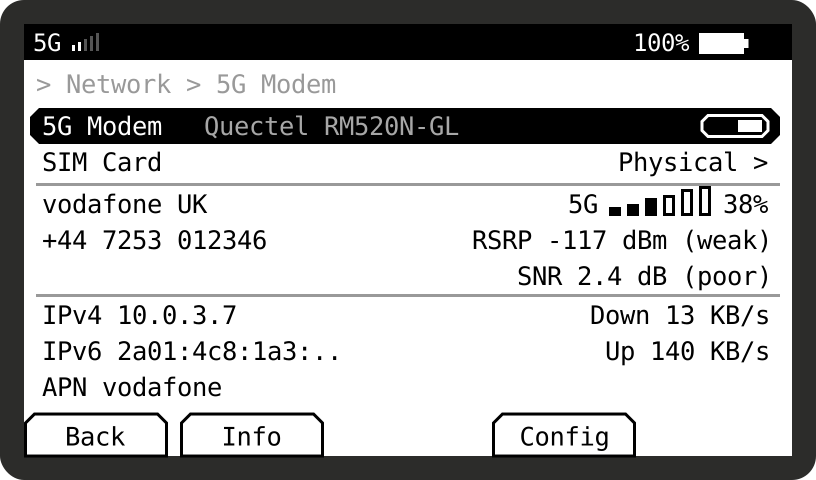
Item 1 is shown selected, which is what lights the Info soft key. The soft keys are, left to right, Escape, View, Power, Edit and Run.
- Up and down move between the four items; a multi-line block is one item, framed as one.
- Soft keys: Back on Escape; Info on View, the key whose role in the FlipCTL docs is help and tooltips; Config on Edit, the key for editing fields. Power is the system's, and Run is left empty.
- Info is active on items 1 and 2 and opens a page of detail for that item. Ok does the item's own action.
- Config opens the modem's settings page. For now it is a placeholder with nothing on it (decided 2026-10-24); radio-mode and band lock are the candidates for later.
- No modem: No modem found in the centre and nothing else.
- Disabled: items 1 and 2 only. The SIM item stays, because the SIM switch is independent of the radio.
- A USB modem has neither the rfkill toggle nor the SIM item; both belong to the M.2 slot.
- Height: the body has 102 px between the breadcrumb and the soft keys: 1 + 1 + 3 + 3 rows of 12 px is 96, which leaves 6 px for the two dividers and the selection frames. It fits without scrolling, but with nothing to spare; a fourth line in either block would make the screen scroll.
- The fonts are printable ASCII only, so the mockup's arrows for download and upload are written Down and Up.
Item 1: 5G Modem .... Quectel RM520N-GL .... ON/OFF
- Middle: the modem's manufacturer and model in the dim tone, from MM Manufacturer and Model (Quectel RM520N-GL here). When it is wider than the room between the label and the toggle it scrolls sideways while the item is selected, and is cut with .. while it is not.
- Right: the toggle. Ok flips it.
- Info opens the modem's device page: manufacturer, model, firmware revision, hardware revision, IMEI, carrier configuration and its revision, how it is connected (USB 3 or USB 2 and the port, or PCIe), MM plugin, primary port, ports and their roles, drivers.
The toggle is bound to the M.2 slot's rfkill switch M.2 WWAN (W_DISABLE1#), matched by its name. (The second switch is M.2 WWAN (WDISABLE2) on the running kernel and M.2 GNSS (WDISABLE2) in the kernel tree; it only turns GNSS off and is not on this screen.)
Blocking it (checked in testing): the module turns its radio off and keeps it off, NM has MM disable the modem, and data stops within a second. After unblocking, the modem registered in 2 s and data was back in 3 s with a new IP address.
While it is blocked the modem stays on USB and MM keeps it listed: model, firmware and IMEI stay; SIM details should stay (to test); MM's own Enable fails with QMI protocol error (4): 'Aborted' until the switch is released (checked); there is no signal, operator or cell.
Item 2: SIM Card .... Physical
The value is the SIM in use, Physical or Flipper eSIM. Ok opens the SIM menu:
- the SIM in use: ICCID, IMSI, operator from the SIM, PIN status (MM UnlockRequired, and UnlockRetries when a PIN is needed), and whether the physical tray is empty;
- at the bottom, one button: Switch to eSIM, or Switch to physical SIM when the eSIM is in use. Switching drops the connection for some seconds (to test), so it is a button at the end of a menu and not a key on the main screen.
Info on this item opens the same SIM menu as Ok (decided 2026-10-24).
This is not the modem's own SIM slot setting. On this board the physical SIM and the Flipper eSIM chip share the modem's SIM 1 lines through an analog switch, driven by a GPIO (sim_sel, GPIO1_C0, set high at boot in rk3576-flipper-one-rev-f0b1c2.dts; the card-detect line is sim_cd, GPIO2_B2). MM sees one SIM slot whichever position the switch is in (checked: MM lists two slots, slot 2 empty).
The eSIM chip on current boards is empty. Production units will come with a provisioned eSIM, so the app does not need to download profiles. On a current board, picking Flipper eSIM should end in No SIM or No service.
To test, in this order:
- Which GPIO level is which card. High is the boot default and the physical SIM works, so high is probably the physical SIM.
- Whether the modem notices the swap by itself (SIM hot-swap detection), or needs to be told: MM Reset(), or toggling the rfkill switch around the swap.
- How long until the modem is registered again.
- Whether sim_cd tells flipctl that the tray is empty, so the menu can show Physical SIM (empty).
The GPIO line is not claimed by any driver, so flipctl can hold it, but it must request the line without changing its direction or value: a request as an input would let the switch float and drop the SIM.
Item 3: operator and signal
A three-line block. Ok opens the signal page.
- Left: the operator's name (see Operator), and the phone number under it when there is one. The number is MM OwnNumbers, which is the MSISDN stored on the SIM; many SIMs do not store it (checked: this Vodafone SIM has none), and then the line is left empty rather than showing --.
- Right, line 1: the network as 3G, 4G, 5G or 5G+ (5G+ is 5G SA, see Connection type), the six bars, and the percentage.
- Right, line 2: RSRP -110 dBm (weak).
- Right, line 3: SNR 2.4 dB (poor).
The words after the numbers, three steps each (decided 2026-10-24; the usual LTE values, used for 5G as well):
| weak / poor | good | excellent |
|---|---|---|---|
RSRP | below -105 dBm | -105 to -90 dBm | -90 dBm and above |
SNR | below 10 dB | 10 to 20 dB | 20 dB and above |
On 3G the pair is RSCP and Ec/Io, with their own steps. In 5G NSA the block shows the 4G anchor's pair, which is what the bars follow; the 5G pair is on the signal page.
The signal page (opened with Ok, contents to agree in detail): the serving cell (PCI, cell ID, TAC, channel, band and frequency), each radio's RSRP, RSRQ, RSSI and SNR, the neighbour cells, the full connection type (5G NSA (5G + 4G LTE core)), and the bands in use (see Band with frequency), and the per-antenna readings below.
Per-antenna readings through ModemManager's debug mode
Planned 2026-10-24; debug mode always on decided the same day. RSRP, RSRQ and SINR on each of the four receive paths (PRX, DRX, RX2, RX3), on the signal page only. The RM520N-GL reports them only to Quectel's AT+QRSRP, AT+QRSRQ and AT+QSINR (standard QMI answers NotSupported), and MM can pass an AT command to the modem with Modem.Command(cmd, timeout) on its own AT port, in its own queue, so nothing collides with MM's traffic. The page reads them that way:
- Only while the signal page is open: the three commands every 2 s, stopped when the page closes. Only on a Quectel modem (2c7c:0801, MM plugin quectel); on any other the section is not shown.
- Only those three commands: flipctl sends no other AT command, and none that writes.
- Reading them: +QRSRP: <PRX>,<DRX>,<RX2>,<RX3>,<LTE|NR5G>. -32768 is no value. On low bands (617-960 MHz, e.g. B20, B28, n28) the modem uses only two paths, so RX2 and RX3 read -32768 by design and are shown as n/a, not as a fault.
What it needs, and what to know about it:
- MM has to run with --debug. Command() answers Operation only allowed in debug mode otherwise (checked during testing). The flag is read when MM starts, so it cannot be switched on for the page and off after it: changing it restarts MM, which drops cellular for about 20 s. So debug mode stays on (decided 2026-10-24), from a systemd drop-in for ModemManager.service, and only the polling follows the page.
- Debug mode opens Command() to more than flipctl. Any process that passes MM's D-Bus policy (Command is on its default allow list) and polkit's Device.Control (allowed to any active local session, and to root) can then send any AT command, including ones that change the modem. Today that is root and the seat1 session, which is flipctl.
- Debug mode logs more. --debug raises MM's logging; to test whether adding --log-level=INFO keeps the journal at its usual volume.
- The drop-in ships like the other files (systemd/, build-flipctl.sh, build_deploy.sh).
Once Command() is available, the same path could also give the carrier aggregation details (AT+QCAINFO) that MM cannot; not planned unless asked.
Signal: 6 bars, a percentage and the absolute values
The bars and the percentage are computed from RSRP:
- RSRP is the power of the cell's reference signal, the number 3GPP defines for LTE and 5G signal strength. It does not change with the channel bandwidth or with how busy the cell is.
- RSSI, which MM's own SignalQuality is based on (as far as I can tell from MM's QMI code; to confirm in the source), is all the power in the channel: the cell, its neighbours, noise, and the cell's traffic. It goes up when the cell gets busier and differs between a 5 MHz and a 20 MHz channel, so it is a poor strength number on LTE and 5G.
- Computed from RSRP, the bars, the percentage and the dBm on screen always agree: -125 dBm = 0%, -75 dBm = 100%, linear, so each of the six bars is about 8 dB (six decided 2026-10-24; step 1 still draws ten). -125 dBm is about where an LTE link stops working; -75 dBm is excellent. The status bar's 5 bars use the same percentage. On 3G the same is done with RSCP.
- No signal or no registration: 0%, empty bars.
Absolute values: RSRP and SNR, one line per radio. RSRP says how strong the cell is, SNR how clean it is; a strong but noisy signal is the usual cause of slow data, and RSRP alone does not show it. On 3G: RSCP and Ec/Io.
In 5G NSA the bars follow 4G. In NSA the 4G link is much more than authentication: it carries all the signalling (connection setup, handovers, the registration with the 4G core), voice over LTE, often the upload, and part of the download. 5G is added on top for capacity. If the 4G link drops, the 5G link drops with it; a weak 5G link only makes data slower. So:
- bars and percentage from the 4G RSRP, because that decides whether the connection holds;
- on the main screen, the 4G pair; on the signal page, a 4G and a 5G line with RSRP and SNR each, so the tester sees both radios (changed 2026-10-24: the main screen's block has room for one pair);
- in 5G SA the bars and the pair are 5G; in 4G and 3G, that radio's.
Source: MM's Signal interface (Lte, Nr5g, Umts). MM reads these only after Signal.Setup(rate). flipctl sets a 10 s rate on every modem as it appears, so the status bar and the menu always have an RSRP to work from, and 2 s while the screen is open. MM reports a missing value as -3276.8; shown as --.
Operator
MM Modem3gpp.OperatorName (vodafone UK here, as the network sends it), with the MCC/MNC (234/15) when the name is empty, and Roaming after it when MM reports roaming.
Connection type
From MM Modem.AccessTechnologies:
MM reports | Shown |
|---|---|
5gnr only | 5G SA (Standalone 5G+) |
lte + 5gnr | 5G NSA (5G + 4G LTE core) |
lte | 4G (LTE) |
hspa+ | 3G HSPA+ (WCDMA) |
hspa, hsdpa, hsupa | 3G HSPA (WCDMA) |
umts | 3G UMTS (WCDMA) |
No 2G: the RM520N-GL has none.
Checked: MM reported lte + 5gnr on 2026-10-21 and lte only on 2026-10-22, on the same cell with the modem connected. MM drops 5gnr whenever the 5G leg is not active, so on a weak or idle 5G link the label moves between 5G NSA and 4G (LTE). That is what the modem is doing, so the screen shows it as it is, without smoothing.
Band with frequency
B1 2100 MHz, n78 3500 MHz. MM does not report the band. It reports the channel number of the serving cell (EARFCN for 4G, NR-ARFCN for 5G) in GetCellInfo, and flipctl turns that into the band and its frequency name with the 3GPP tables.
Several bands (decided): the screen shows only what MM reports as serving, and guesses nothing.
- 4G and 3G: the primary band only. MM does not report LTE carrier aggregation (checked: B1 was serving while the B20 and B7 secondary carriers appeared only as neighbours), and the neighbour list cannot tell a secondary carrier from a neighbour cell.
- 5G NSA: the 4G band and the 5G band, B1 2100 MHz + n78 3500 MHz, if MM lists the 5G cell as serving. To test: there was no stable 5G during testing. If MM does not list it, the 4G band only.
Item 4: the data connection
A block of up to three lines. Ok opens the network page.
- Left: IPv4 10.0.3.7, IPv6 ... when the connection has one, and APN vodafone. From NetworkManager's device for the modem (its IP4 and IP6 config, and the connection's gsm.apn). An IPv6 address too long for the room is cut with ..; the whole address is on the network page.
- Right: Down 13 KB/s and Up 140 KB/s, the interface's current speed, from the byte counters in /sys/class/net/<iface>/statistics read once a second while the screen is open.
- With no data connection: Not connected on the left and nothing on the right.
The network page (opened with Ok, contents to agree): interface name, all addresses, gateway, DNS, MTU, the NetworkManager connection's name, route metric and whether it is the default route, and the bytes sent and received since connecting.
Left out: not available through ModemManager
Decided 2026-10-21: not on the page, because MM cannot report them on this modem: module temperature, LTE carrier aggregation, the serving cell's bandwidth, CQI and transmit power, switching SA and NSA separately. Per-antenna readings were on this list until 2026-10-24 and are now planned through MM's debug mode, above.
Permissions
What flipctl, running as user on seat1, can already do and what it needs:
What | Status | Needed |
|---|---|---|
Read MM properties (state, operator, technology, signal %, SIM, port) | works (checked with the spike below, as user) | none |
Signal.Setup, Reset, Enable | allowed: polkit's Device.Control is yes for an active local session, and flipctl's process is in one (checked with pkcheck) | none |
GetCellInfo (the band) | refused by MM's D-Bus policy (checked: AccessDenied ... member="GetCellInfo"), which allows a fixed list of methods and this is not on it | a D-Bus policy file allowing it for user |
rfkill toggle | /dev/rfkill is 0664 root:root and gets its write access through seat0 (uaccess), and flipctl is on seat1 | a group for /dev/rfkill, see System files. Not moving it to seat1: the HDMI desktop on seat0 would lose its own radio switches |
SIM/eSIM GPIO | gpio group and char-gpiochip are in flipctl.service already | none |
Building the prototype
Talking to ModemManager: zbus
flipctl has no D-Bus client today; everything it knows about the network comes from nmcli processes (net.rs) and netlink. For MM it gets one, zbus (pure Rust, blocking API), because the page needs to be told when MM's values change rather than ask (the third live-data shape in CLAUDE.md), and that is D-Bus signals.
Spike, built and run on this device as user (in the scratchpad, not in the repo): zbus 5.19, default-features = false, features = ["blocking-api", "async-io"], the release profile of this workspace.
Measured | Result |
|---|---|
GetManagedObjects on MM | one call, 7 ms, every modem with all its properties |
Properties read as user | Model, State, Physdev, SignalQuality, AccessTechnologies, SimSlots, OperatorName: all fine |
GetCellInfo as user | AccessDenied from the bus policy, as expected |
Subscribing to PropertiesChanged | match rule accepted; no change arrived in the 6 s window, so the event path still needs a real change to watch |
Cold build | 4 min 20 s on the device, 85 crates in the tree |
Binary | the whole spike is 1.05 MB stripped; flipctl is 10.6 MB and already has serde, so the increase should be under that |
The alternatives were worse: mmcli or busctl processes would bring back the prototype's subprocesses and still need a monitor process for events, and a hand-written D-Bus client is far more code than netlink.rs for a protocol with variants and nested dictionaries.
Where the code goes
Piece | Where | What |
|---|---|---|
MM watcher | crates/flipper-ui/src/mm.rs, feature modem | a thread holding the zbus connection: GetManagedObjects at start, then InterfacesAdded / InterfacesRemoved (modems coming and going) and PropertiesChanged. Keeps a list of modems behind a mutex with a dirty flag, the shape of net.rs. Every modem gets Signal.Setup(10); a handle the main screen holds raises it to 2 s and adds a GetCellInfo every 5 s, and dropping it turns both back down, which is how pollers already stop with their screen |
rfkill | crates/flipper-ui/src/rfkill.rs | reads /dev/rfkill events (being told, no polling) and writes a block/unblock for the M.2 WWAN switch |
SIM switch | crates/flipper-ui/src/simsel.rs | the GPIO through the kernel's GPIO character device, requested as-is. After the tests above |
View model | crates/flipper-ui/src/modem.rs | pure functions, unit-tested with today's values: port name from Physdev, the entry's state text, the connection type label, RSRP to percentage and bars, EARFCN / NR-ARFCN to band (modem/bands.rs), the main screen's rows. Mentions neither Slint nor the terminal |
Screens | crates/flipper-ui/ui/modem.slint + bin/flipctl | the 10-bar signal block is a new component (its sizes and tones in tokens.toml); the rest are existing row kinds: the toggle, the menu selector (the dropdown picker), label/value rows |
Network menu | bin/flipctl/src/main.rs | NETWORK is a fixed list today; the 5G Modem entries are built from the modem list: one entry for zero or one modem, one per modem otherwise, with the port in the row's tag field only in that case (ListItem.tag, drawn after the label) and the state in status |
System files | systemd/ here | see System files |
Removed | sysinfo::modem(), modem_rows(), the qmicli and mmcli calls | recorded in inventory.md as a divergence from the prototype's single page |
Order
- Read-only: MM watcher, view model with tests, the Network entries, the main screen without the two controls, the status bar's 5G badge. Works without any system file except the band, which shows -- until the D-Bus policy file is installed.
- rfkill toggle, with the rfkill group.
- SIM selector, after the GPIO tests.
Each step ends with sh ci/test.sh, a golden for the new screen, a --png --screen modem frame, and a deploy with ./build_deploy.sh --panel for you to look at on the device.
System files
flipctl's machine-side files already live in systemd/ here, and there are two ways they reach a device:
Path | Who | Where the files go |
|---|---|---|
The image | linux-build-scripts/build-flipctl.sh, run by build-ospack.sh | builds flipctl from this repository and copies each file from systemd/ by name into the vendor paths under /usr (/usr/lib/udev/rules.d/, /usr/lib/sysusers.d/, ...) |
A dev deploy | ./build_deploy.sh | writes the same files into /etc on the running device and applies them (systemd-sysusers, udevadm trigger, ...), so they can be tried before an image is built; --status reports whether each is present |
So a file added to systemd/ is in the next image only once build-flipctl.sh has a line for it, and on a dev device only once build_deploy.sh has one.
What the 5G Modem page adds:
Change | File | Image (build-flipctl.sh) | Deploy (build_deploy.sh) |
|---|---|---|---|
The D-Bus policy allowing GetCellInfo for user | new: systemd/flipctl-modemmanager.conf | new line: /usr/share/dbus-1/system.d/ | new step: /etc/dbus-1/system.d/, then ask dbus to reload |
/dev/rfkill to an rfkill group | one line in the existing 70-flipctl-devices.rules | nothing new | nothing new |
The rfkill group | one line in the existing flipctl.sysusers.conf | nothing new | nothing new |
flipctl in that group, and the node allowed | SupplementaryGroups and DeviceAllow=/dev/rfkill rw in flipctl.service | nothing new | nothing new (the deploy's drop-in copies these two lines from the unit) |
The D-Bus policy file:
<!DOCTYPE busconfig PUBLIC "-//freedesktop//DTD D-BUS Bus Configuration 1.0//EN"
 "http://www.freedesktop.org/standards/dbus/1.0/busconfig.dtd">
<busconfig>
  <!-- flipctl's 5G Modem page reads the serving cell's band. ModemManager's own
       policy allows a fixed list of methods and leaves this one to root. -->
  <policy user="user">
    <allow send_destination="org.freedesktop.ModemManager1"
           send_interface="org.freedesktop.ModemManager1.Modem"
           send_member="GetCellInfo"/>
  </policy>
</busconfig>
user because that is who flipctl.service runs as. The image also creates a flipctl system user that the unit does not use today; if the unit moves to it, this policy moves with it. MM should still ask polkit (Device.Control) before answering, as it does for its other methods; to confirm once the file is installed.
The rfkill line, beside the gpio and USB lines already there:
SUBSYSTEM=="misc", KERNEL=="rfkill", GROUP="rfkill", MODE="0664"The uaccess ACL for the seat0 desktop stays as it is; the group only adds flipctl.